
Business Listing Management for Canadian Small Businesses

Business listing management means keeping your business details identical and complete everywhere customers find you: Google, Bing, maps, directories and review sites. For a Canadian trade, clinic or local shop, the listing that matters most is your Google Business Profile, followed by the handful of directories that feed other search tools. Get those right, check them on a schedule, and connect them to your website and a way of tracking calls. That is the whole job, and it is worth doing as one piece of work rather than a dozen scattered ones. We build and run that work in-house at UPMYSITE for small businesses around Burlington, Oakville and Hamilton.
TL;DR
- A listing is any public page that shows your business name, address, phone number, hours and website. Management is keeping all of them accurate and the same.
- Start with your Google Business Profile, then the main search, map and Canadian directory listings your customers actually use.
- Duplicates are the most common damage: Google allows one profile per business and hides ones it treats as duplicates.
- Measure results in calls, direction requests, form fills and booked jobs, not in how many directories you appear on.
- Listings work best when the profile, the website and lead tracking are handled by one team, so nothing is lost between them.
Table of Contents
- What business listing management actually is
- Which details must match everywhere
- Where to start: your Google Business Profile
- The other listings worth keeping accurate
- How to find and fix duplicate or unauthorized listings
- What local listing management services include
- How to tell whether your listings are working
- Common mistakes to avoid
- How listings connect to local SEO and your website
- A simple 90-minute starter plan
- Our view: listings are a lead system, not a chore
- Get your listings working for you
- FAQ
- Sources
What business listing management actually is
A business listing is a public record of your company: name, address, phone, website, category, hours, photos and a short description. Some you create yourself. Others are built automatically from data that was copied from older sources, which is why a business that moved five years ago can still show the old address on a map app.
Listing management is the routine of four tasks:
- Finding every listing that exists for your business, including ones you did not create.
- Claiming the ones you can control, so only you can edit them.
- Making the details match your current reality, word for word.
- Checking back, because details drift: hours change, a number gets retired, a directory merges your profile with someone else’s.
The reason this matters for a local business is simple. When someone searches “plumber near me” or “physio Oakville”, the results show a map pack and profile details before they show a single website. If the phone number there is wrong, or the profile says closed on a day you are open, the customer calls the next business. You never see that lost call.
Which details must match everywhere
Consistency is the core of the work. These are the fields to lock down and then copy exactly into every profile:
| Field | What to standardize | Common drift |
|---|---|---|
| Business name | The name customers see on your sign and invoices | Added keywords, old name after a rebrand, “Inc.” on some listings only |
| Address | One format, including unit or suite | “Street” vs “St.”, suite number missing, old location |
| Phone | One primary local number | Tracking numbers used without a main number listed, retired lines |
| Website | One canonical address | http vs https, old domain, redirects to a dead page |
| Hours | Regular hours plus holiday changes | Holiday hours never updated, seasonal hours left in place |
| Category | The one that best describes your main service | Generic category, or a different one on each site |
| Description and photos | Same short description, current photos | Outdated storefront or logo |
Pick the exact spelling and format once and keep it in a shared document. Whoever updates a listing, whether you, your office manager or an agency, copies from that document. Most inconsistency is not an error, it is two people who each wrote the address slightly differently.
Where to start: your Google Business Profile
If you do only one listing well, make it this one. It controls how you appear in Google Search and Google Maps, and it is where reviews, calls and direction requests are counted. Complete every field, choose accurate categories, add real photos, list your services, and keep hours current. If you are a service-area business such as an electrician or cleaner that travels to customers, set your service area rather than publishing a home address you do not want shown.
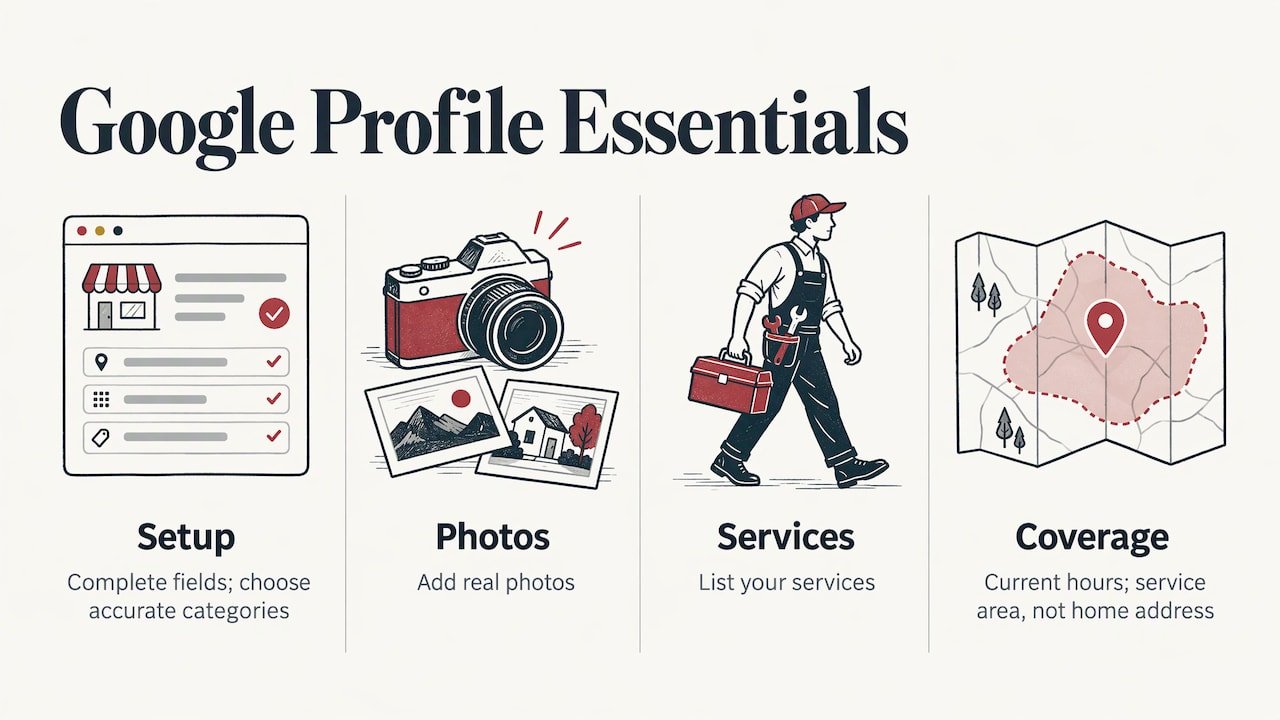
This is also the profile where small mistakes cost the most, so it is worth having it set up properly once. Our Google Business Profile optimization is a one-off job from $399.
The other listings worth keeping accurate
After Google, the sensible order for a Canadian small business is:
- Bing and the other map and search platforms. Bing lets you claim an existing listing or create one, and it can import details from your Google profile, which saves retyping and keeps the details identical.
- Apple Maps and other navigation apps. Many customers on iPhones never open Google Maps. A wrong pin or hours here sends people to the wrong door.
- Major Canadian directories. National directories such as Yellow Pages, plus review platforms your customers use, often appear in results for your name and category.
- Industry and local directories. A clinic belongs in its regulatory college or professional association directory. A contractor belongs in the local chamber of commerce or board of trade listing and in any trade association it holds membership in. These are small in number and high in trust.
- Social profiles. Facebook and Instagram pages carry your address, hours and phone number too, and they get found.
You do not need to be on 100 directories. A short list of platforms your customers genuinely use, all accurate, beats a long list in which a third are stale. Ask new customers how they found you and add the places they name.
How to find and fix duplicate or unauthorized listings
Duplicates happen when a business moves, changes its name, merges with another, or when a former employee or marketer created a profile you never knew about. Google’s own help page is direct about the rules: it allows one profile per business and hides profiles it treats as duplicates from Search and Maps. That means a duplicate is not harmless clutter. It can pull reviews and visibility away from the profile you actually want people to see.
Here is the routine:
- Search for yourself. Look up your business name, your phone number and your old address, on Google and Maps and in a private browser window so personalization does not hide anything.
- Note every profile that appears. Record the name, address, phone and who owns it.
- Unverified profile for your business? Claim and verify it. If someone else owns a verified one, request access through Google’s process. Google’s guidance says that if the owner does not respond within three days, you may have the option to claim it.
- Duplicate of your own profile? Follow Google’s duplicate and ownership process so the extra profile is merged or removed rather than left to compete.
- Wrong details on a directory? Claim the listing on that directory and correct it at the source. Edits on a platform that only copies data from others tend to get overwritten.
- Write down what you did and when. You will want that record at your next check.
A moved business should also mark the old location properly instead of leaving two live addresses. And if a listing shows a closed or relocated status when you are open, fix it quickly, because customers tend to trust the map over your website.
What local listing management services include
When a business pays someone to handle this, the work should cover a clear set of outcomes:
- An audit of existing and duplicate listings.
- Claiming and verifying the profiles that matter.
- Correcting details to your single master record.
- Optimizing the Google profile: categories, services, photos, description.
- A schedule for rechecking, plus updates when hours or details change.
- Reporting in terms you can act on, such as calls and enquiries.
The question to ask of any provider is who actually does the work and where it connects to the rest of your marketing. Listing work that sits with one vendor, the website with another and the ads with a third creates the exact inconsistency you are trying to remove: three people each holding a slightly different version of your address and offer. Delivering listings, website, local search and tracking from one in-house team removes the handoffs. That is how we run it at UPMYSITE.
How to tell whether your listings are working
A complete listing is not the goal. Enquiries are. Track these numbers, monthly, from the same sources each time:
- Calls and direction requests from your Google Business Profile performance reports. These are the clearest sign a local searcher took action.
- Website clicks from the profile, which you can separate from other traffic by tagging the link in your profile.
- Review count and average rating, because they influence which business a searcher picks.
- Form submissions and bookings on your website, as a measure of the visits the profile sends.
- Your own count of booked jobs or appointments in the same period, and where each came from.
Two habits make this reliable. First, ask every new caller how they found you and write it down. Second, set up conversion tracking so a call or form submission registers as an event rather than just a page view. Our analytics and tracking setup starts at $449 as a one-off, and every UPMYSITE client has UPMYCRM, which consolidates leads and communications in one place so you can see which enquiries turned into work.
A worked example
Imagine a Hamilton physiotherapy clinic that moved down the street two years ago. Its Google profile has the new address, but an older directory still shows the old one and a phone number now used by a different office. A patient finds the old listing, drives to the wrong place, and books elsewhere. In a review of that clinic’s listings you would find three things to fix: the directory address, the phone number, and a second Google profile created by a former front-desk employee. Each is a ten-minute fix once found. The expensive part is that nobody was looking.
Common mistakes to avoid
- Keyword-stuffing the business name. Your listing name should be your real business name, not a name plus services and cities.
- Using a tracking number as the only number. If you use call tracking, keep your main local number consistent in the places that matter.
- Setting and forgetting. Hours, holiday schedules and services change. A quarterly check is a sensible minimum.
- Ignoring reviews. Reply to them politely and promptly. They are part of your listing’s public face.
- Listing a virtual or home address you cannot serve. Use the service-area option if customers do not visit you.
- Letting a previous marketer hold the logins. Make sure you, the owner, are an owner of every important profile.
How listings connect to local SEO and your website
Listings tell search engines who you are and where you work. Your website tells them what you do. When the two disagree, for example a different phone number in the site footer than in your profile, you weaken both. A Local SEO plan covers that connection: location pages, on-page details, and the profile working together. Our Local SEO plan for one city starts at $499 per month, and a business serving a wider region can look at the National SEO plan, from $999 per month. If you want the difference explained, local SEO versus traditional SEO covers it for Burlington businesses.
Speed matters too. A profile that sends a customer to a slow site loses the visit, so a website speed optimization from $399 is often worth doing alongside the listing work. And if calls arrive when you are on a job, our AI Receptionist with missed-call text-back is designed to respond to people who would otherwise reach voicemail.

A simple 90-minute starter plan
If you want to begin today, this is the order that gives the most return:
- Write your master record (15 minutes): name, address, phone, website, hours, category, description.
- Audit Google (20 minutes): search your name, phone and old addresses; list every profile you find.
- Fix your Google Business Profile (25 minutes): complete every field, add current photos, confirm categories.
- Claim the top directories (20 minutes): Bing, Apple Maps, your main Canadian directory, and one industry listing.
- Set tracking (10 minutes): tag the website link in your profile and decide where you will record calls.
- Book a recheck in your calendar for 90 days out.
Our view: listings are a lead system, not a chore
Most owners treat listings as a one-time admin task, and then wonder why the phone is quiet. We treat them as the front door to local lead generation.
Our approach at UPMYSITE is to put the profile, the website, local SEO, ads and lead tracking under one in-house team. That removes the delays and confusion of subcontractors and handoffs, and it means the number on your profile is the number on your site, in your ads and in your CRM.
We focus on immediate results, calls and enquiries, rather than long-term promises. Every client gets UPMYCRM, so the leads your listings bring in are consolidated with the rest of your communications instead of scattered across inboxes and voicemail.
the author
Get your listings working for you
If you would rather hand this over, we start with the Google Business Profile, because it is where local customers decide. Our Google Business Profile optimization is from $399 one-off, and it can sit alongside a Local SEO plan from $499 per month, so your listings, website and tracking all point the same way.
To see everything we do for small businesses in Burlington, Oakville and Hamilton, visit UPMYSITE.
FAQ
How often should I check my business listings?
Check every quarter at a minimum, and any time your hours, phone number, address or services change. Holiday hours deserve their own update each year. A recorded master record makes each check a matter of minutes.
Do I need to be on every business directory?
No. Focus on Google, Bing, Apple Maps, the main Canadian directories your customers use, and the listings tied to your trade or profession. Accurate and complete on a short list is better than a long list that goes out of date.
What should I do if there is a duplicate Google profile for my business?
Search for it, then claim and verify it or request access if someone else owns it. Google says it allows one profile per business and hides profiles it considers duplicates from Search and Maps, so resolving it protects your visibility. Keep a note of what you changed.
How do I know if listing management is bringing me business?
Watch calls, direction requests, website clicks from your profile and form submissions, then compare them to the jobs or appointments you actually booked in the same month. If you track where each enquiry came from, the answer is visible within a few cycles.