
Small Business Website Maintenance: What It Covers in 2026

Small business website maintenance is the routine work that keeps your site secure, fast, accurate and able to turn visitors into calls: software updates, backups, security scans, fixing broken pages and forms, and keeping content current. You can do some of it yourself, but it is a recurring job with real consequences when it slips, so most owners are better served by handing it to one team that already runs their site. We offer that through our Keep Safe, Keep Found and Keep Growing plans, from $99 a month.
This guide covers what the work involves, how often each task comes due, what to look for in a maintenance agreement, and how to decide between doing it in-house and hiring it out.
TL;DR
- Maintenance is a standing routine, not a one-off fix: updates, backups, security, speed, forms, links and content all need regular attention.
- HubSpot says every website needs a maintenance plan, whether you run it yourself or hire it out.
- Neglect costs you leads quietly: a broken contact form or a slow page does not announce itself, you just get fewer calls.
- Before signing any agreement, confirm who owns your files, what the hosting terms say, the full yearly cost and when support is available.
- Our maintenance plans start at $99 a month (Keep Safe), $299 (Keep Found) and $599 (Keep Growing), delivered by the same in-house team that builds and markets sites.
Table of Contents
- What website maintenance actually is
- What happens when a site is left alone
- The maintenance checklist, by frequency
- WordPress maintenance: updates, backups and security
- Can you do it yourself?
- What a maintenance agreement should spell out
- What maintenance costs in Canada
- Maintenance and lead generation are the same job
- How to choose a maintenance provider
- Our perspective
- Let us look after the site
- FAQ
- Sources
What website maintenance actually is
A website is not a brochure you print once. It is software running on a server, usually with a content management system (the admin area where you edit pages, such as WordPress), plugins (add-on features like contact forms or booking) and a theme (the design layer). Each of those parts is updated by its developer, and the internet around it keeps changing: browsers, phones, search engines and attackers.
HubSpot describes maintenance as the umbrella of tasks that keep a site up to date and working: applying software updates, backing up data, running security scans and updating content. Shopify’s maintenance guide extends the list to broken-link and error checking, mobile responsiveness, performance and database optimization, spam management, form testing, cross-browser testing and legal compliance.
For a plumber, a dental clinic or a local retailer, that long list boils down to four outcomes: the site stays up, stays safe, stays fast and keeps producing enquiries.
What happens when a site is left alone
Shopify’s guide ties neglect to slower performance and higher bounce rates (visitors who leave straight away), broken links that frustrate people, lost leads from outdated content or faulty forms, and security risks that can damage a brand’s reputation. It also notes that regular upkeep builds trust and supports search rankings.
The pattern we see in the problems that matter to small businesses is the same: nothing visibly breaks, so nobody notices. A form that stopped sending email three months ago looks fine on screen. An old plugin works until the day it is exploited. The cost shows up as missed calls and enquiries that never arrived, which is the number you care about.
We go deeper on the consequences in our piece on what happens if you skip website maintenance and on why maintenance is cheaper than a full rebuild.
The maintenance checklist, by frequency
How often each task is due depends on how much your site changes and how much it earns. The schedule below is a practical working rhythm for a typical small business site, not a rule from any standard. A site that takes bookings or online orders deserves the tighter end of each range.
| Task | What it protects | Typical rhythm |
|---|---|---|
| Backups, stored away from the web server | Your ability to recover from a hack, a bad update or a hosting failure | Automated daily or weekly, restore tested occasionally |
| Core, theme and plugin updates | Security and compatibility | Weekly check; security fixes as soon as they appear |
| Security scan and login protection | Protection against malware and break-ins | Continuous or weekly |
| Uptime monitoring | Knowing the site is down before a customer tells you | Continuous, with alerts |
| Form and phone-link testing | Leads actually reaching you | Monthly, and after any update |
| Broken links and error pages | Visitor trust and search visibility | Monthly |
| Speed and mobile check | Bounce rate and rankings | Quarterly |
| Content review: hours, prices, staff, services | Accuracy for customers and search engines | Quarterly, and whenever something changes |
| Legal and privacy wording | Compliance | Yearly, and when your practices change |
| Domain, SSL certificate and hosting renewals | Avoiding an outage from an expired item | Yearly, with calendar reminders |
The table looks routine, and it is. The difficulty is not knowing the tasks. It is that they never end, they interrupt the work you actually get paid for, and the failure mode is silent.
WordPress maintenance: updates, backups and security
Most small business sites run on WordPress, so it deserves its own section. Because it is open-source software with a large plugin ecosystem, it needs steady attention in three areas.
Updates, tested before they go live
UBC’s Office of the CIO, in its WordPress security guidance, recommends testing every update functionally and for security in a staging environment first (a private copy of the site) and only then replicating it to the live site. That keeps the impact on the live site to a minimum. For a business that depends on its site for bookings, this is the difference between a smooth update and an afternoon of lost enquiries.
Hardening the login and the surface
The same UBC checklist includes HTTPS for all communication, restricting access to the admin and login pages, two-factor authentication, blocking XML-RPC (an older remote-access feature attackers often probe), running a security plugin and culling unused plugins. Unused plugins are worth singling out: every plugin you no longer need is code that still has to be kept current for no benefit.
Backups you have actually restored
A backup nobody has tried to restore is a hope, not a plan. Keep copies somewhere other than the server that hosts the site, and make sure the restore process is known before you need it at 7 a.m. on a Monday.
When the site is already infected
If your site is redirecting visitors, sending spam or showing warnings in search results, that is a cleanup job rather than routine maintenance. We handle this as a fixed-price WordPress malware cleanup, from $299, and our maintenance plans exist so it does not happen again.
Can you do it yourself?
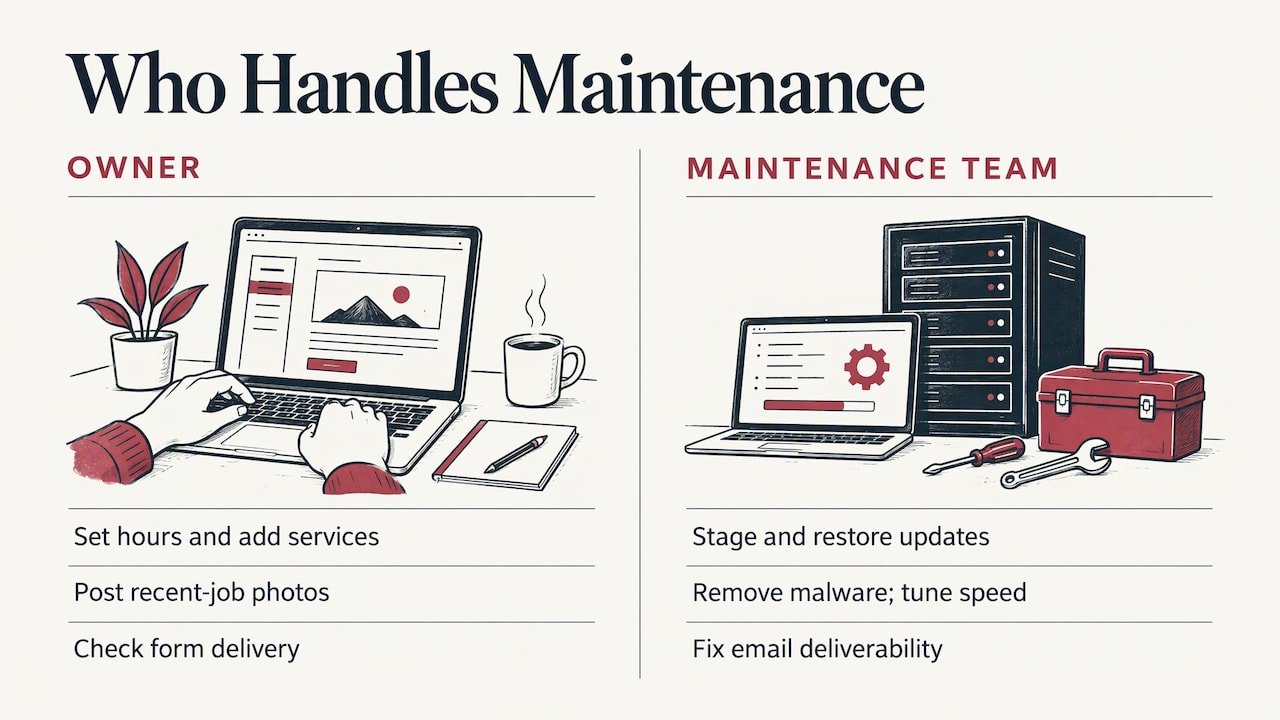
Some of it, yes. Updating your own opening hours, adding a new service page, posting photos of recent jobs and checking that your contact form delivers are all tasks an owner can handle in a few minutes a month. Content is the part of maintenance that only you truly know.
The technical layer is different. Updates that need staging, restores after a failed update, malware removal, speed tuning and email deliverability (making sure your form notifications and quotes do not land in spam) are specialist work, and the cost of getting them wrong lands on your revenue. The practical split for most trades, clinics and retailers is simple: you own the content, and your maintenance team owns everything underneath.
The real price of doing it yourself is attention. Ten minutes here and there seems cheap until a job runs long and the updates pile up for six months, which is exactly when a vulnerable plugin gets found.
What a maintenance agreement should spell out
BDC, the Canadian development bank for entrepreneurs, has a useful guide to maintenance contracts for your website. Its points translate into a short list of things to confirm before you sign anything:
- Hosting terms. BDC advises asking for the hosting provider’s terms and conditions, particularly the hosting and security clauses, so you know who is responsible for what if something goes wrong.
- The full yearly cost. Ask for the whole year, not just the first month, including any hours or changes beyond the plan.
- Support hours that match yours. BDC recommends a service level that fits your operating hours. A restaurant that peaks on weekends and a clinic that books on Monday mornings need different cover.
- Your files. BDC recommends obtaining all your website files at launch and updated copies every three to six months, so the site is never held hostage by a single supplier.
- Warranty versus maintenance. BDC notes that initial warranties typically last no more than 30 days after launch, and that most firms charge either a flat monthly fee or a bank of hours. Once the warranty ends, ongoing care needs to be arranged on purpose.
Two further questions are worth asking any provider: who actually does the work, and how many hands a request passes through. A plan delivered by an in-house team removes the waiting that comes with subcontractors and handoffs.
What maintenance costs in Canada
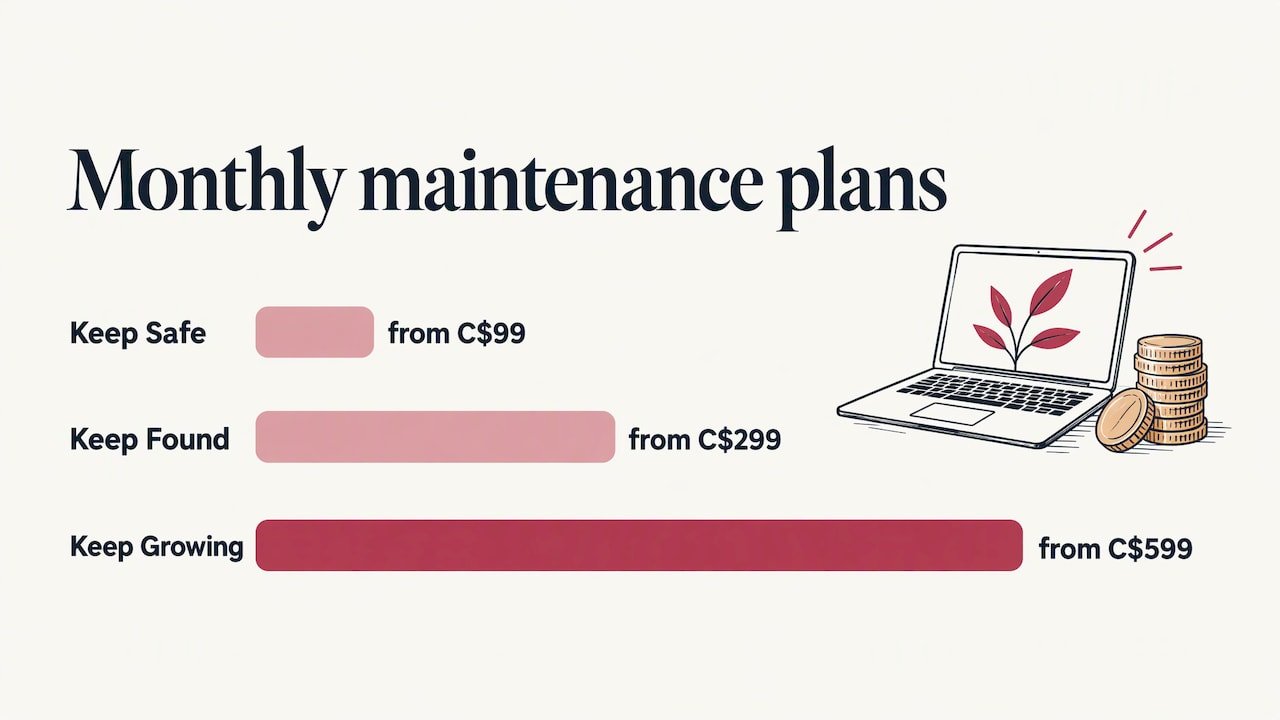
Prices vary with the size of the site, whether it sells online and how much support is included, so the sensible comparison is between what each plan covers and your own risk, not between headline numbers. Our published plans, all in Canadian dollars per month, are:
| Plan | Price | Best suited to |
|---|---|---|
| Keep Safe | from $99 a month | A straightforward site that needs to stay protected and running |
| Keep Found | from $299 a month | A site that also needs to keep earning search visibility |
| Keep Growing | from $599 a month | A site that is expected to keep improving and bringing in leads |
Prices were read from our site in November 2026 and start from the figures shown; the maintenance page has the current plan details. If your site was built elsewhere and sits on a host you want to leave, our website migration, from $999 one-off, moves it to one place where it can be looked after.
It also helps to compare maintenance against the alternative. Cleaning up a hacked site, losing weeks of enquiries to a broken form, or rebuilding a site that fell too far behind to update all cost more than steady monthly care.
Maintenance and lead generation are the same job
For a business that lives on local leads, maintenance is not a technical chore sitting off to one side. It is part of how the phone rings.
- Speed. Slow pages lose visitors before they read a word. Our speed optimization, from $399 one-off, fixes the heavy images and scripts behind a lot of that.
- Tracking. If analytics break after an update, you stop knowing which pages and ads produce calls. Analytics and tracking setup starts at $449 one-off.
- Email deliverability. Quote requests that land in spam are lost jobs. Our email deliverability fix starts at $149 one-off.
- Search visibility. Fresh, accurate, error-free pages support rankings, which is why maintenance sits so close to SEO and conversions.
- Missed calls. If you cannot always answer the phone on a job site or with a patient, our AI receptionist with missed-call text-back is built to catch the enquiry.
How to choose a maintenance provider
Use the same criteria for anyone you consider:
- One accountable team. You want a single point of contact who can fix a form, a plugin conflict and an ad landing page without relaying messages.
- A clear scope in writing. Know what is included each month and how extra work is priced.
- Backups and recovery. Ask where backups are stored and how fast the site can be restored.
- Ownership. You should hold your domain, hosting login and site files.
- Connection to results. A provider that also understands local search, ads and lead handling will maintain the site with the goal of producing enquiries, not just green checkmarks.
If you are weighing a platform change at the same time, our comparison of WordPress, Wix and Squarespace for Canadian small businesses sets out the trade-offs.
Our perspective
Most owners who come to us do not have a technology problem. They have a time problem. The site was built well, then left, and the first sign of trouble is a quiet phone.
We built Upmysite so that one in-house team handles the website, the ads, the search work and the fixes. When the person maintaining your site is the same person who knows what your Google and Meta campaigns are sending to it, a broken form or a slow landing page gets caught for what it is: a lost lead, not a ticket in a queue.
That is also why every client gets UPMYCRM, which brings leads and communications into one place. Maintenance, to us, is not about keeping software tidy. It is about protecting the calls and inquiries your business depends on, and we have been doing this for over 20 years.
the author
Let us look after the site
If you would rather spend your hours on customers than on plugin updates, our maintenance plans cover the routine from $99 a month. We are based in the Burlington area and serve small businesses across Canada, mainly trades, clinics, local retailers and service providers. Pick the plan that matches how much your site has to do for you on the website maintenance page, and we will take it from there.
If you do not yet have a site worth maintaining, start with a Starter, Business or Online Store build, from $1,499, $2,499 and $3,499 one-off respectively.
FAQ
How often should a small business website be maintained?
Backups, security monitoring and uptime checks should run continuously or at least weekly. Updates are best checked weekly, forms and links monthly, and speed and content quarterly. Sites that take bookings or sell online should sit at the tighter end of those ranges.
What is included in website maintenance services?
At a minimum: software updates, backups, security scans and fixes for things that break. HubSpot lists updates, backups, security scans and content updates as the core, and Shopify adds performance, forms, links and compliance checks. Always get the scope in writing, including how extra work is charged.
Do I need WordPress maintenance if my site is small?
Yes. A small site runs the same core software and plugins as a large one, and attackers do not choose targets by size. UBC’s guidance recommends staged testing of updates, login hardening and removing unused plugins regardless of site size.
How much does website maintenance cost?
It depends on the site and the support included. Our plans start at $99 a month for Keep Safe, $299 for Keep Found and $599 for Keep Growing. Ask any provider for the full yearly cost, as BDC advises.
Who owns my site files if I hire someone?
You should. BDC recommends getting all your website files at launch and updated copies every three to six months. Make that a written term of the agreement before work starts.
Sources
- Website Maintenance: What It Is and Key Tasks (Shopify)
- What Is Website Maintenance? 11 Tasks to Keep Your Site in Shape (HubSpot)
- Securing WordPress (UBC Office of the CIO)
- Developing the right maintenance contract for your website (BDC)