
Contractor Website Design: What Brings in Calls in Canada

A contractor website has one job: turn a homeowner searching on a phone into a call or a quote request. Good design helps, but the pieces that matter are the pages, the proof, the speed, the buttons and how the site connects to local search. At UPMYSITE, a Burlington agency, one in-house team builds the site, runs the search and ad work around it, and routes every enquiry into one CRM. Starter sites begin at $1,499.
TL;DR
- Keep the menu to 4 to 6 pages and put a call or quote button on every page.
- Show 6 to 10 strong project photos and testimonials tied to real jobs, with names, neighbourhoods or project types.
- Build for phones first: more than half of Canadian homeowners browse on mobile when researching contractors.
- A site is only found if local search is set up around it: Google Business Profile, service pages and speed.
- Our site builds start at $1,499 (Starter), $2,499 (Business) or $3,499 (Online Store), one-off.
Table of Contents
- What a contractor website is actually for
- The pages you need (and the ones you don’t)
- Trust signals that carry the sale
- Calls to action and the contact form
- Built for the phone first
- Getting found: the site is only half the job
- What a contractor site costs with us
- Why one team matters
- Getting started
- FAQ
- Sources
What a contractor website is actually for
Homeowners rarely browse a contractor’s site for fun. They have a leaking roof, a basement to finish or a panel to upgrade. They check two or three businesses, look for proof that you do the work they need in their area, and contact the one that makes it easiest.
That changes how you judge a design. The gallery-style sites that dominate design inspiration lists look impressive, but the test is simpler: can a visitor tell within a few seconds what you do, where you work and how to reach you? Everything below is built around that test.
The pages you need (and the ones you don’t)
The Canadian Home Builders’ Association (CHBA) recommends limiting the top menu to 4 to 6 pages, for example Home, Services, Portfolio, About and Contact. For most trades that is enough, with a few additions:
- Home: what you do, the area you serve, a call button and a quote button, plus a few proof points near the top.
- Services: one page per main service (roofing, electrical panel upgrades, bathroom renovations). Separate pages give each job its own chance to appear in search, and each can carry its own photos and call to action.
- Portfolio: finished jobs, labelled by type and neighbourhood.
- About: who answers the phone, how long you have been in business, licences, insurance, and memberships.
- Contact: phone, a short form, service area and hours.
Skip the blog until the basics are done, and skip anything that pushes the phone number below the first screen on a mobile device.
Trust signals that carry the sale
A homeowner is letting you into the house and handing you a large cheque. The site has to reduce that worry.
CHBA’s guidance lists the signals to use: customer testimonials with names, neighbourhoods or project types, before-and-after photos, certifications and association membership. It also advises a portfolio of at least 6 to 10 strong photos before you launch or refresh.
A few practical rules:
- Use your own photos. Real crews, trucks and finished jobs beat stock images every time.
- Put the testimonial next to the work it describes. A quote from the Oakville homeowner beside the Oakville kitchen photos does more than a page of anonymous praise. One trade-marketing writer makes the same case for pairing each project’s photos with that client’s quote.
- Show credentials where decisions happen: licence numbers, WSIB or insurance coverage, and association logos on the home and quote pages, not hidden in the footer.
- Name the city. “Serving Burlington, Oakville and Hamilton” tells both the visitor and search engines where you work.
Calls to action and the contact form
Every page should end in a clear next step. CHBA suggests simple, action-oriented buttons such as Request a Quote, Book a Consultation, Call Now and Get Started, placed at the top of the homepage, at the end of each major section, on service pages, and in the header or footer.
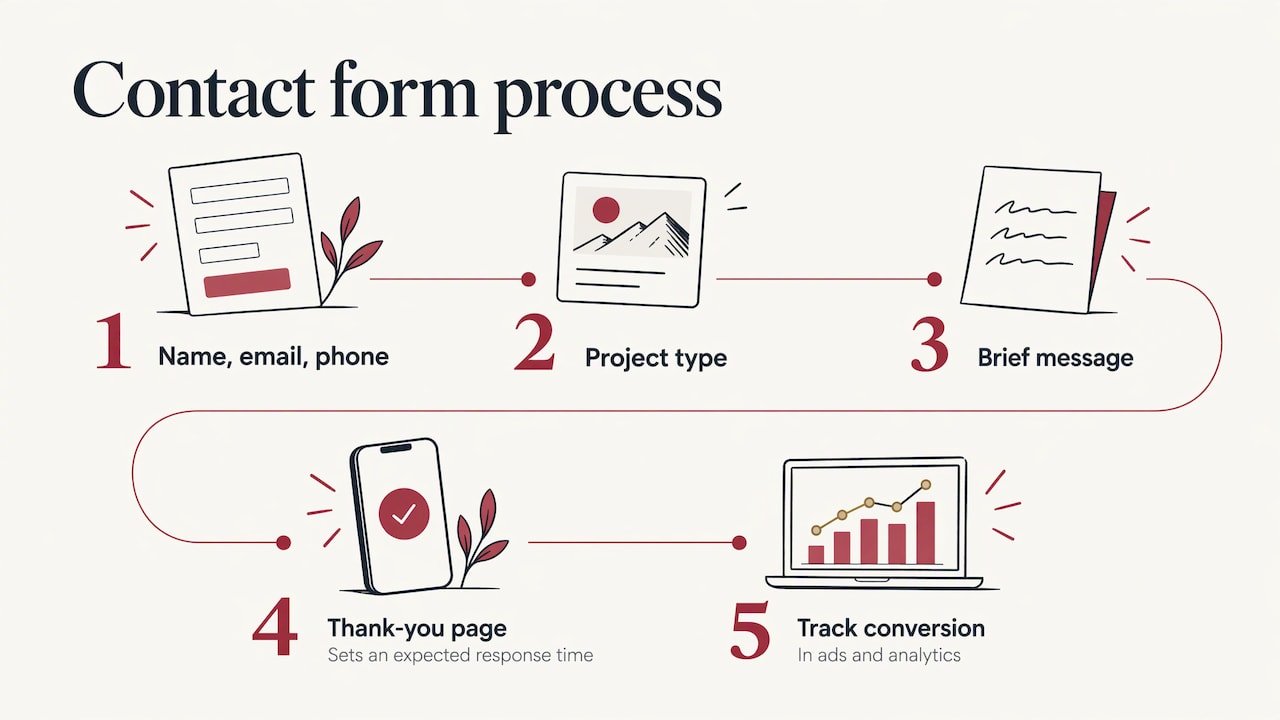
Keep the form short: name, email, phone, project type and a brief message. Then send people to a thank-you page that says when they can expect a response. That page also gives you a clean conversion to track later in your ads and analytics.
Make the call button a real tap-to-call link. On a phone, the call is often the whole conversion.
Built for the phone first
CHBA notes that more than half of Canadian homeowners browse on their phones when researching contractors, and that a fast, mobile-friendly site with large tap buttons, full-width photos and readable text supports search ranking and helps capture leads from ads.
In practice, check these on your own phone, on mobile data rather than office Wi-Fi:
- The phone number and quote button are visible without scrolling.
- Photos load quickly and are not oversized files.
- Buttons are big enough for a thumb, and text needs no pinching.
- The form works with a phone keyboard.
Heavy sliders, auto-playing video and bloated plugins are the usual culprits for slow pages. Our clean web design approach covers how lean builds help speed, search and conversions. If you already have a site that drags, our Speed Optimization service starts at $399 one-off, on its own page.
Getting found: the site is only half the job
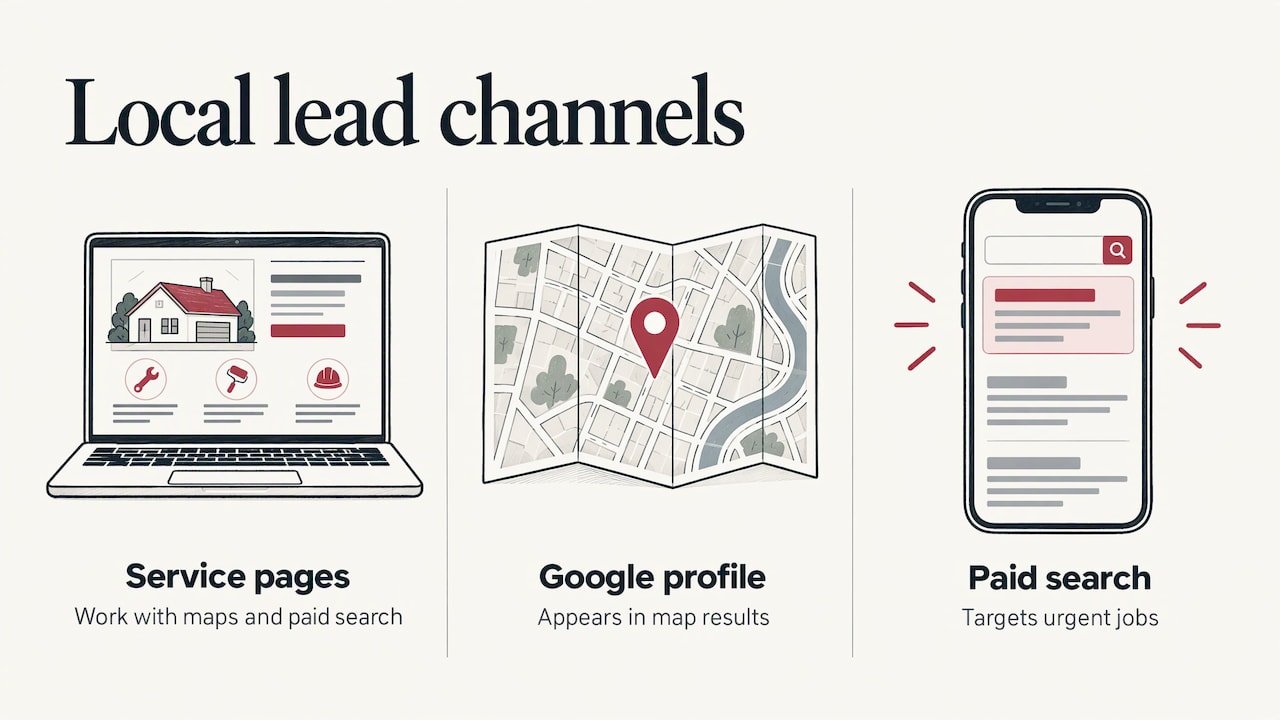
A well-designed site nobody finds produces nothing. Local trades win mostly through three channels working together: the site’s service pages, the Google Business Profile that appears in the map results, and paid search for urgent jobs.
The map results matter because homeowners searching “electrician near me” often see them before any website. Where you rank can differ from one street or neighbourhood to the next, which is why grid-based Google Maps rank tracking for contractors exists: it shows where in your service area homeowners actually find you.
To go deeper, we have written guides on contractor SEO services, Google Ads for contractors and lead generation for contractors in Canada.
What a contractor site costs with us
Our published prices, as read from our site, are one-off for the build:
| Site type | Price | Fits |
|---|---|---|
| Starter Site | from $1,499 | A sole operator or small crew who needs a credible, fast presence |
| Business Site | from $2,499 | Multi-service trades that need several service pages and a portfolio |
| Online Store | from $3,499 | Retailers and suppliers selling products online |
After launch, the ongoing pieces are monthly: maintenance plans run from $99 (Keep Safe) to $299 (Keep Found) and $599 (Keep Growing) per month. Local SEO starts at $499 per month, and Search Ads at $399 per month. Details are on our website design page and maintenance page.
Why one team matters
When the web designer, the SEO person and the ad manager are three different companies, nobody owns the result. The ad sends people to a page the designer built without tracking, and the SEO work waits on a developer who is busy elsewhere.
We deliver design, SEO, Google and Meta ads and maintenance from one in-house team, so there are no subcontractor handoffs. We focus on what a trade owner measures: calls and enquiries, not long-term promises.
Every client also gets UPMYCRM, which brings leads and communications into one place. For a contractor on a job site, that means a form submission or a missed call does not vanish into an inbox.
We have been in business for over 20 years, and we build for trades, clinics and local services across Burlington, Oakville and Hamilton.
the author
Getting started
If you need a new site, our Starter, Business and Online Store builds cover the pages, proof and phone-first layout described above. Add a Google Business Profile Optimization from $399 one-off so the map results point to the site, and a missed call does not have to mean a lost job: our AI Receptionist with missed-call text-back is available on request.
Tell us your trade and service area through upmysite.ca and we will show you which build fits.
FAQ
How many pages does a contractor website need?
Most trades do well with 4 to 6 top-level pages: Home, Services, Portfolio, About and Contact. Add individual service pages underneath Services so each job type has its own page.
How many project photos should I have before launching?
CHBA advises at least 6 to 10 strong project photos in the portfolio. Before-and-after pairs are especially persuasive, and each is best labelled with the job type and neighbourhood.
What should the quote form ask for?
Keep it to name, email, phone, project type and a short message. Follow it with a thank-you page that says when the visitor will hear back.
Does the website alone bring in leads?
It is the base that everything else points to. Local SEO, a well-set-up Google Business Profile and Google Ads send homeowners to it, and clear calls to action turn those visits into calls.
Sources
- CHBA Marketing How-To Series: Website Essentials
- How Skilled Trade Companies Can Turn Project Pages Into Lead-Generating Assets