Automated Lead Follow-Up: A Setup Guide for Small Businesses

Automated lead follow-up means every enquiry, whether it comes from a web form, a phone call you missed or an ad, gets an immediate reply and a scheduled series of next steps without anyone typing them by hand. For a contractor on a roof, or a clinic with a full front desk, that is the difference between a lead that books and one that calls the next business on the list. We build this as one connected system at UPMYSITE: the website, the ads, the Google Business Profile and UPMYCRM, which consolidates leads and communications in one place, all handled by one in-house team.
TL;DR
- Automated follow-up has three parts: capture every lead in one place, send an instant first reply, then run a short, relevant sequence that stops when the person books or opts out.
- Most of the work is upstream: a lead that never reaches your system cannot be followed up. Fix forms, call tracking and missed calls first.
- In Canada, commercial emails and texts need consent, your identity and a working unsubscribe, and you should keep a record of where consent came from.
- Measure time to first contact, leads by source and how many become booked jobs, not how many messages went out.
- Keep the automation for the routine steps and keep people for quotes, questions and anything urgent.
Table of Contents
- What automated lead follow-up actually does
- Step 1: Get every lead into one place
- Step 2: Send a first reply that sounds like you
- Step 3: Build a short follow-up sequence
- Step 4: Follow the Canadian rules
- Step 5: Measure whether it works
- Where automation should stop
- Why we run this as one system
- What it costs to get started at UPMYSITE
- FAQ
- Sources
What automated lead follow-up actually does
Picture a Tuesday afternoon. A homeowner in Oakville fills in your quote form while you are up a ladder. Without automation, the enquiry sits in an inbox until evening. With it, three things happen within moments: the enquiry lands in your CRM (customer relationship management software, the place where leads and conversations are stored), the person receives a confirmation that names your business and says when to expect a call, and you get an alert with their details.
That is the core. Everything else, reminders, second and third touches, booking links, is built on top of it. The goal is not to replace you. It is to make sure the first reply never depends on whether you were free.
The pieces are simple:
- A capture point. Forms, click-to-call buttons, ad lead forms, Google Business Profile calls and messages.
- A single home for leads. One list where each person appears once, with their source and history.
- Triggered messages. An email or text that fires when something happens: form submitted, call missed, quote sent.
- Rules for stopping. The sequence ends when the lead books, replies or opts out.
Step 1: Get every lead into one place
This is the part that people searching for “lead capture integration” are really asking about. Integration means the form, the phone line and the ad platform all deliver their enquiries to the same system, with the same fields filled in. When they do not, leads live in three inboxes and a voicemail box, and follow-up becomes guesswork.
What to connect:
- Website forms. Keep them short. Name, phone, email and one question about the job is usually enough. Every extra field costs you submissions. A site built to convert, with a visible form and tap-to-call button on every page, is the foundation; our piece on web development that converts clicks into clients covers the layout side.
- Ad leads. Google and Meta campaigns can send enquiries straight into your CRM instead of leaving them inside the ad platform’s own dashboard. Our Meta Pixel and Conversions API setup (from $299 one-off) makes sure Meta receives what actually happened after the click, which also improves who the ads reach next.
- Missed calls. For a trade or clinic, the phone is often the main lead source. We offer an AI receptionist with missed-call text-back, so a caller you could not answer gets a reply instead of silence.
- Google Business Profile. Calls and messages from your listing are leads too. They should be logged with the source, not remembered.
Tag each lead with where it came from. The route an enquiry took to arrive (a form, a call) is not the same thing as the marketing that produced it (Google Ads, Local SEO, a referral). Keep both, because the second tells you which spend is working.
When you set this up, submit a test enquiry through every form and confirm it appears in the CRM with the right fields, the right source and a notification. Do this again after any website change. Broken forms are the quietest way to lose business.
Because UPMYCRM comes with our services, the website, the ads and the lead list are connected by the same team, so there are no handoffs between a web developer, an ads freelancer and a software vendor to go wrong.
Step 2: Send a first reply that sounds like you
Speed matters because someone enquiring is usually asking several businesses at once. Research on lead response is not unanimous about the ideal window: an analysis of lead-conversion data reports that contacting a web lead within the first hour is what counts, and that the best window it found was somewhat wider than the “five minutes” slogan. The practical lesson is the same either way: reply in minutes with an automatic message, then follow with a human call as soon as you can.
A good first message does four things:
- Names your business, so the person knows who is writing.
- Confirms what they asked about, in their words where possible (“your bathroom renovation enquiry”).
- Says what happens next and when (“we’ll call you before noon tomorrow”).
- Gives one easy action: a booking link or a reply.
Example for an HVAC company:
Hi Priya, thanks for contacting Lakeshore Heating & Cooling about your furnace. We’ll call you today before 5 p.m. to book a visit. If it’s an emergency, call us now at 905-555-0123.
That is short, specific and has a way out for urgent cases. It does not pretend to be a person typing live, and it does not need to.
Match the message to the lead
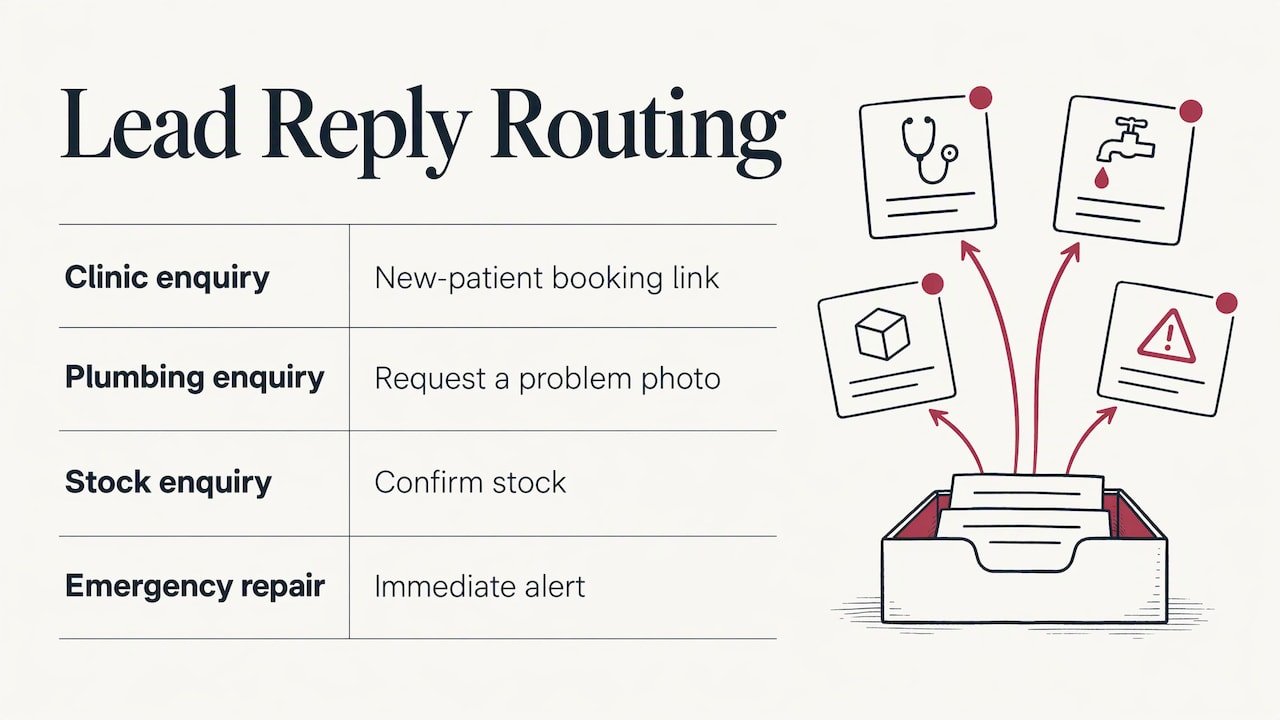
A single generic sequence for everyone feels like spam. Vary the reply by what the person asked for. A clinic should send a new-patient booking link; a plumber should ask for a photo of the problem; a retailer should confirm a stock enquiry. Urgency matters too: an emergency repair request should alert you immediately, not enter a slow nurture sequence.
Step 3: Build a short follow-up sequence
Most leads do not answer the first message. A sequence is a handful of scheduled touches that continue until the lead responds. The same lead-conversion analysis found that won leads typically received several contact attempts, most of them in the first four to five days, then more widely spaced ones. You do not need that many for a local job, but the pattern is a good guide: front-load the effort, then ease off.
A workable sequence for a quote request:
| When | Channel | Purpose |
|---|---|---|
| Within minutes | Email or text | Confirm receipt, say when you’ll call |
| Same day | You (phone) | Personal call; the automation steps back once you log it |
| Day 2 | Text | Short check-in with a booking link |
| Day 4 | Answer the common question (price range, process, timeline) | |
| Day 8 | Last gentle nudge, with an easy way to say “not now” |
Three rules keep this useful rather than annoying:
- Stop on any reply. Nobody should receive a “just checking in” message after they have already booked.
- Stop on opt-out. Immediately and automatically.
- Keep a person in the loop. When a lead replies with a real question, a notification should reach someone who can answer it properly.
Sequences work for quotes you have already sent as well. If a quote has had no answer after a few days, a calm reminder from your CRM recovers jobs that would otherwise drift away. For businesses running paid campaigns, pairing this with Google Ads retargeting brings visitors who did not enquire back to your site.
If your volume is high and you want conversational qualification and appointment booking across several channels, AI lead follow-up and response automation shows what that wider category of tooling can cover.
Step 4: Follow the Canadian rules
Automation multiplies mistakes as easily as it multiplies good habits, so build compliance in from the start.
Email and text are commercial electronic messages. Canada’s anti-spam law, CASL, requires consent before sending a commercial electronic message to an electronic address, plus sender identification, contact information and an unsubscribe mechanism. The same law sets out that unsubscribe requests must be processed within 10 business days; automating the removal the moment someone clicks is safer than relying on that outer limit.
What that means in practice:
- Keep proof of consent. Government guidance advises businesses to retain evidence of consent, so store the source and timestamp with each lead. A web form submission with a clear consent line is a record; a verbal “sure, text me” you did not write down is not.
- Know the two kinds of consent. Express consent, where the person clearly agrees, does not expire unless withdrawn. Implied consent, for example from a recent enquiry or purchase, is time-limited.
- Identify yourself and include contact details in every message, and make the unsubscribe link work.
- Use texting sparingly. Federal guidance on texting clients is to text only when it is useful, identify your business and honour STOP requests.
Privacy matters as well. If your forms or pixels pass customer details to ad platforms, the Privacy Commissioner’s 2023 Home Depot findings are worth knowing: the Office concluded that an email address given for an e-receipt did not mean consent to share purchase details with Meta for advertising, and that express opt-in consent was required there. Write consent wording that tells people plainly what you collect and why.
CASL and privacy law have details that depend on your situation. If you are unsure whether your consent wording is enough, a Canadian lawyer is the right person to review it.
One technical point belongs here too: follow-up emails that land in spam are worthless. SPF, DKIM and DMARC are the settings that prove your emails really come from you. Our email deliverability fix sets these up from $149 one-off.
Step 5: Measure whether it works
Sending automated messages is not the result. Booked jobs are. Track these in your CRM and review them monthly:
- Time to first contact. How long between enquiry and first human or automated reply?
- Leads by source. Which of Google Ads, Local SEO, Meta, your Business Profile and referrals actually produce enquiries?
- Lead to booking rate. What share of leads become appointments, and what share of those become paying customers?
- Lost leads. Missed calls with no callback, forms that failed, enquiries stuck with no reply.
That last list is where the quickest wins hide. A source that produces many leads but few bookings usually has a follow-up problem, not a traffic problem. Analytics and tracking, set up properly, show this clearly; our Analytics & Tracking Setup is from $449 one-off.
Where automation should stop
Automate the routine: confirmations, reminders, booking links, missed-call replies, quote nudges. Hand over to a person for price negotiation, sensitive health questions at a clinic, complaints and anything urgent. A lead that asks a specific question and receives a generic template reply is worse off than one who waited ten minutes for a human.
Why we run this as one system
Most small businesses we work with do not have a leads problem first. They have a handoff problem: the website lives with one vendor, the ads with another, the phone with nobody, and enquiries fall in the gaps between them.
Our approach is to put it all under one team. We build the website, run the Google and Meta ads, optimize the Business Profile and connect all of it to UPMYCRM, so every call and form lands in one list. Because the same people manage the source of the lead and the place it arrives, nothing waits on a subcontractor to answer an email.
Our focus is on immediate results: calls and inquiries, not long-term promises. Follow-up automation is how those inquiries turn into booked work. We have been in business for over 20 years, working with trades, clinics and local service providers across the Greater Toronto Area, and the pattern is consistent in our approach: capture everything, reply fast, keep it human where it counts.
the author
What it costs to get started at UPMYSITE
Follow-up works only when there are leads to follow up. Our plans cover both sides. On the lead-generation side, Search Ads and Ads Pro start at $399 and $749 per month, Local SEO starts at $499 per month, and Social Ads from $399 per month. For a new site with forms and click-to-call built in, Starter Site, Business Site and Online Store start at $1,499, $2,499 and $3,499 one-off. The AI receptionist with missed-call text-back has no published price, so ask us for a quote.
If you want to see where your enquiries are being lost today, talk to our team about connecting your website, ads and phone to one lead system.
FAQ
Is automated lead follow-up the same as email marketing?
Not quite. Email marketing usually sends campaigns to a list. Lead follow-up reacts to one person’s action, such as a form submission or a missed call, and runs a short sequence that ends when they book or opt out. The two can share the same CRM.
Do I need consent before sending an automated text to a new enquiry?
In Canada, texts and emails that promote or encourage commercial activity are covered by CASL, which requires consent, your identification and an unsubscribe option. Keep a record of how and when each person agreed. For specific situations, such as a purchased list, ask a Canadian lawyer.
How many follow-up messages are too many?
For a local service business, a first reply plus three or four spaced touches over about a week is a sensible ceiling. Stop the moment the person replies, books or opts out. Sending more rarely helps and can damage trust.
What if my website has no CRM connected to the forms?
Then enquiries probably arrive as plain emails, which are easy to miss and impossible to track by source. Connecting the forms to a CRM is the first job, and it is something we build into our website and marketing work.
Sources
- Canada’s anti-spam legislation (CASL), consolidated text
- Getting consent to send email, Innovation, Science and Economic Development Canada
- Texting for good client relations, Innovation, Science and Economic Development Canada
- PIPEDA Findings #2023-001: Investigation into Home Depot of Canada, Office of the Privacy Commissioner of Canada
- A Data Driven Approach to Lead Conversion