Website Design in Oakville: What You Get, What It Costs
A good Oakville website does one job: it turns a neighbour searching on their phone into a call, a booking or an order. Design matters, but only as far as it gets that result. The businesses that get the most from a new site usually hire one team to build it, set up tracking, connect it to local search and look after it afterwards, so nothing falls between a designer, a marketer and a developer. That is how we work at Upmysite: web design, SEO, ads and maintenance by one in-house team, with sites starting at $1,499.
This guide is for owners of trades businesses, clinics, shops and local service companies. It explains what a designer actually delivers, how a project runs from first call to launch, what to prepare, how pricing is structured and what to do once the site is live.
TL;DR
- Website design is more than visuals: it covers page planning, build, speed, tracking, testing and launch, and the result should be measured in calls and enquiries.
- Our one-off site prices start at $1,499 for a Starter Site, $2,499 for a Business Site and $3,499 for an Online Store.
- A project goes faster when you arrive with a clear goal, a page list and your photos, reviews and services written down.
- Using a single team for design, search visibility, ads and upkeep avoids the handoffs that slow projects down.
- A site needs care after launch: updates, security, backups and tracking are part of the plan, not extras.
Table of Contents
- What website design for an Oakville business includes
- How a website project runs, step by step
- What to prepare before you contact a designer
- What website design costs, and what changes the price
- How to choose a web designer in Oakville
- Turning a website into local leads
- What to plan for after launch
- Our view: why one team builds a better site
- Start with a site built to bring in enquiries
- FAQ
- Sources
What website design for an Oakville business includes
When people search “website design Oakville” or “web designer Oakville”, they are often comparing very different things under one label. A template dropped onto a domain name and a site built around how your customers actually find and choose you are both called web design.
A complete project covers these pieces:
- Structure and page plan. Which pages exist, what each one is for and what a visitor should do next on it.
- Visual design. Layout, typography, colours and photography that fit your brand and look right on a phone, where most local searches happen.
- Build. The site is built on a platform you can update, usually WordPress or a store platform for shops.
- Content. Service descriptions, calls to action, contact forms, reviews and an FAQ written for your customers.
- Speed and technical setup. Fast loading, secure hosting, correct redirects and a clean structure search engines can read.
- Tracking. Analytics that count calls, form fills and orders, so you know what the site produces.
- Launch and aftercare. Testing, going live and keeping the site secure and current.
The tracking line is the one owners most often skip, and it is the one that tells you in six months whether the site is paying for itself. We include it in how we think about every build, and it is also available as a separate analytics and tracking setup from $449 for sites that are already live.
How a website project runs, step by step
Professional guides describe the same arc. Capterra’s website development guide lists information gathering, planning, design, content creation, development, testing, launch and maintenance as the common phases. Here is what each means for a business owner, and where projects tend to stall.
1. Discovery: goals, customers, competitors
The designer asks who your customers are, what they search for and what a good month looks like. Figma’s guide to web design and development says discovery should settle audience, goals, site structure and user flows before any visual work begins. Where it goes wrong: skipping this and starting with colours. A site designed before the goal is clear gets redesigned within a year.
2. Planning: scope, schedule, budget
Capterra says planning should fix scope, tasks and milestones, schedule, cost estimate, resources and who is responsible for what before implementation starts. For you, that means a written list of pages, a date for each approval and one named person who replies to questions. Delays almost always come from waiting on the client side for photos, text or sign-off, so agree turnaround times at the start.
3. Wireframes and design
A wireframe is a simple page sketch without colours or photos. Figma’s guide treats wireframes and prototypes as a way to reduce risk, because you can review how a visitor moves through the site before development begins. Changing a sketch is quick. Changing a finished build is not. Review the wireframe as a customer would: can I find the phone number, the services and the booking button within a few seconds?
4. Content and build
Text and images go in, forms are connected and the pages are built. This is the stage where subcontracting hurts: when design is done by one party and development by another, small details get lost in the handoff. Our team handles design and development in-house, so the person who designed the page is not explaining it to someone outside the company.
5. Testing
Test every form, every phone link and every page on a phone and a laptop. You can also run technical checks on the finished site, for example with this website health checklist, which covers what to check and how often, from certificates to uptime.
6. Launch and early review
WordPress.com’s launch checklist advises lining up analytics and Search Console, security, user accounts, backups and promotion at or before launch. Check that your Google Business Profile points to the new site and that old addresses redirect to new ones. Then review the first weeks of enquiries against your goal.
What to prepare before you contact a designer
A short list of decisions saves days of back and forth. MooseBase’s 2026 small-business guide advises starting with the site’s goal, whether that is leads, sales, information, credibility or support, because the goal decides structure and features. It also recommends a page plan covering home, about, services or products, contact, testimonials and an FAQ, each with a clear purpose and next action.
Bring these to the first conversation:
- One main goal. For a plumber it is phone calls. For a clinic it is booked appointments. For a shop it is orders.
- Your service area. Oakville, Burlington, Mississauga, Milton or all of the GTA? This shapes both pages and search strategy.
- Your services, in priority order. The ones you most want more of go first.
- Real photos. Your team, your vehicles, your clinic, finished jobs. Local customers respond to real people.
- Reviews and credentials. Licences, certifications, memberships and your best Google reviews.
- Access. Your domain registrar login, existing hosting details and your Google Business Profile.
- A decision maker. One person who can approve designs quickly.
What website design costs, and what changes the price
Prices vary widely across the GTA because the scope varies. The honest way to compare quotes is by what is included, not by the headline number. Our published one-off starting prices, listed on our web design and development page, are:
| Site type | Starting price (CAD) | Suits |
|---|---|---|
| Starter Site | $1,499 one-off | A new or small business that needs a credible, working presence |
| Business Site | $2,499 one-off | Trades, clinics and service companies that need several service pages and lead capture |
| Online Store | $3,499 one-off | Retailers selling products online |
Three things move a project’s price up or down:
- Number of pages and how custom they are. A five-page service site and a thirty-page clinic site with separate treatment pages are different jobs.
- Online selling. Products, payments, shipping and inventory add real work, which is why the store is a separate tier.
- Existing assets. Moving an old site, writing content or fixing speed and tracking problems adds scope. If you already have a WordPress site you like, a website migration starts at $999 and a speed optimization at $399.
When you compare quotes, ask each one the same questions. Is hosting included? Who owns the site and domain? Is mobile design included? Is tracking set up? What happens if the site is hacked or breaks? A low price that leaves these out often costs more after launch.
How to choose a web designer in Oakville
Oakville has many freelancers and agencies, and most can produce an attractive homepage. The differences show up in what happens around the design. Use these criteria:
- Do they build for results you can measure? Ask how calls and enquiries are tracked, and what the first report will show.
- Is everything under one roof? If design, search, ads and upkeep are handled by different companies, you become the project manager. Our positioning is that all services are delivered in-house by one team, which removes delays and confusion from subcontractors and handoffs.
- Do they understand local trades, clinics and shops? Look for examples in your kind of business, not only pretty portfolios.
- Is pricing published and clear? Fixed one-off prices for builds and monthly fees for ongoing work let you budget.
- How long have they been doing this? We have been in business for over 20 years and carry a perfect Google rating.
- Do you get a way to manage leads? Every client receives our UPMYCRM platform, which consolidates leads and communications in one place, so enquiries do not disappear into several inboxes.
Proximity helps for meetings, but the GTA is a single working market, and a team in neighbouring Burlington serves Oakville businesses with the same ease as one across town. Our Oakville digital marketing page shows how we work with local companies.
Turning a website into local leads
A site that looks good but is not found or does not convert is an expensive brochure. Three things connect your site to customers in Oakville.
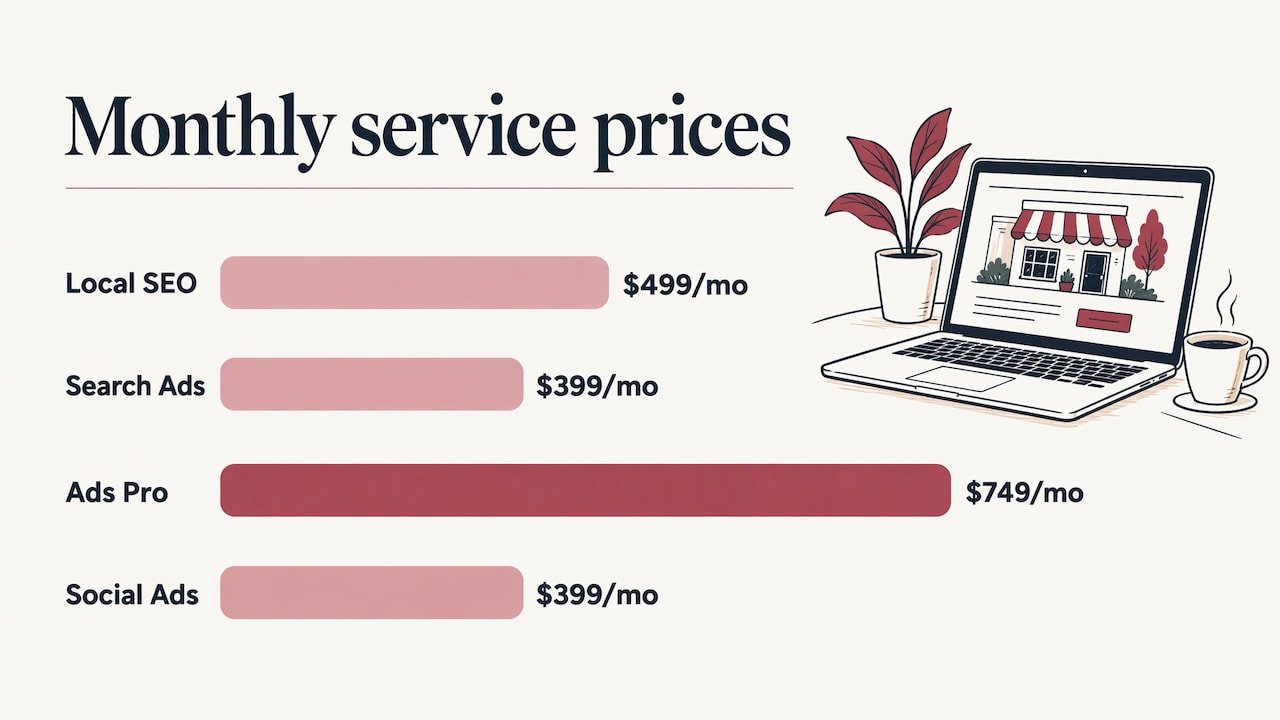
Local search. Customers type things like “electrician Oakville” or “dentist near me”. Your pages need to say clearly what you do and where, and your Google Business Profile needs to be complete and consistent with your site. We offer Google Business Profile optimization from $399 one-off, and Local SEO from $499 per month for ongoing visibility in your area.
Paid ads for faster traction. A new site takes time to climb organically. Google search ads put you in front of people searching right now. Our Search Ads plan starts at $399 per month, and Ads Pro at $749 per month. Our guide to Oakville Google Ads campaigns explains how local campaigns are set up. For Facebook and Instagram, Social Ads starts at $399 per month.
Fast response. A lead that waits is often a lead lost. Contact forms should route into one place, and missed calls should get an answer. We also set up an AI receptionist with missed-call text-back, so a call you cannot take still gets a reply.
A practical test of whether the site works: after the first month, count how many calls, form fills and bookings came from it. If tracking was set up at launch, that number is in front of you. If not, you are guessing.
What to plan for after launch
A website is not finished at launch. Plugins need updating, security needs watching, backups need to run and content goes stale. The WordPress.com launch checklist mentioned above includes security, backups and analytics as launch-time items for this reason.
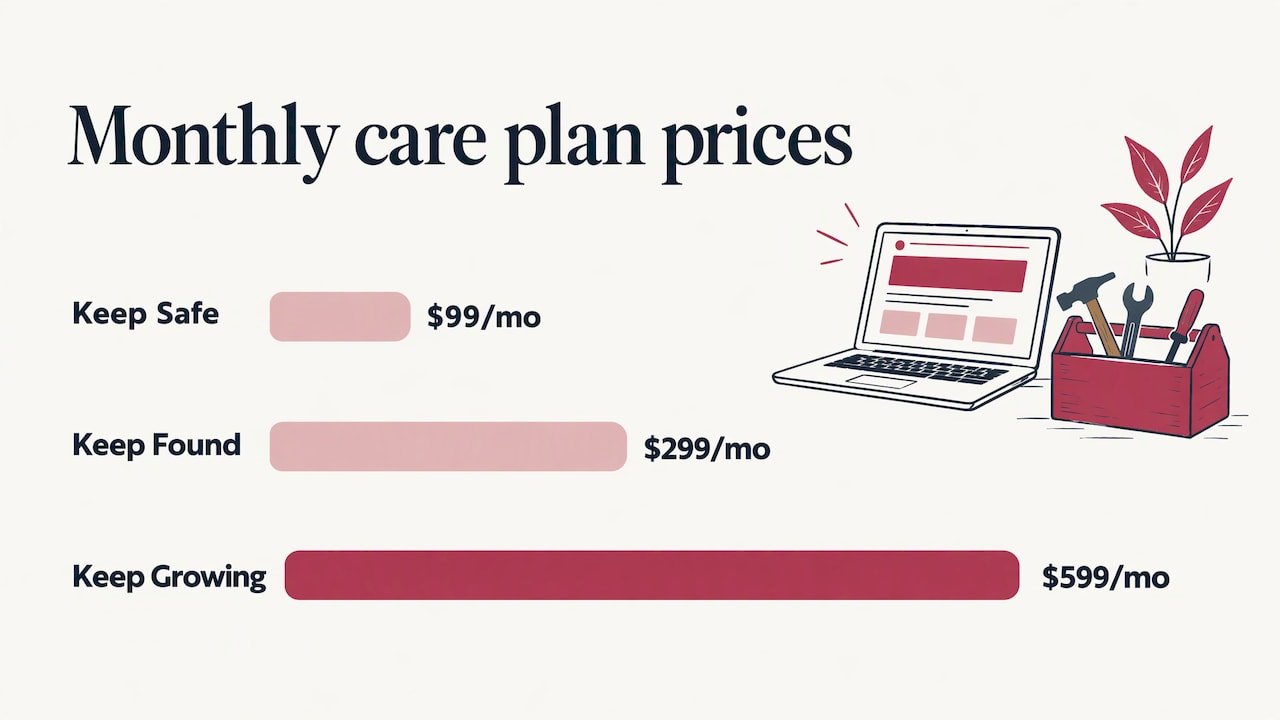
We offer monthly care plans on our website maintenance page:
| Plan | Starting price (CAD) |
|---|---|
| Keep Safe | $99 per month |
| Keep Found | $299 per month |
| Keep Growing | $599 per month |
For a closer look at what upkeep covers, read our guide to small business website maintenance. If a WordPress site has already been compromised, our WordPress malware cleanup starts at $299 one-off.
Our view: why one team builds a better site
Most websites that disappoint owners were not badly designed. They were built in isolation. A designer finished the pages, handed them to a developer, who handed them to someone running ads, who had no access to the analytics. Every handoff is a place where intent gets lost.
We do it differently. At Upmysite, design, development, SEO, Google and Meta ads, and maintenance are delivered by one in-house team. We pair web design with data-driven marketing and focus on immediate results, calls and enquiries, rather than long-term promises.
That is also why every client gets UPMYCRM. The point of a website is not traffic, it is a conversation with a customer. Seeing leads and communications in one place makes it obvious what is working.
If you run a trades business, a clinic or a local shop in Oakville, ask of any site: who will answer for it a year from now? We would like that to be us.
the author
Start with a site built to bring in enquiries
If you want a website built, tracked and looked after by one team, our web design and development packages start at $1,499 for a Starter Site, $2,499 for a Business Site and $3,499 for an Online Store. Tell us your trade, your service area and your goal, and we will point you to the right one.
If you want to see the thinking behind current designs, our piece on web design trends in Oakville is a good next read.
FAQ
How much does a website cost in Oakville?
It depends on the number of pages, whether you sell online and what you already have. Our one-off prices start at $1,499 for a Starter Site, $2,499 for a Business Site and $3,499 for an Online Store. Ongoing care starts at $99 per month.
How long does a website project take?
It depends on scope and on how quickly content and approvals come back. Planning with milestones and a named approver at the start is the best way to keep it moving. Ask for a schedule in writing before you sign.
What do I need to provide?
A main goal, your list of services, your service area, photos, reviews, and logins for your domain and Google Business Profile. A short page plan covering home, services, about, contact, reviews and FAQ is enough to start.
Do I need ongoing maintenance after the site launches?
Yes, plan for it. Updates, security, backups and tracking need regular attention. Our Keep Safe plan starts at $99 per month, with Keep Found and Keep Growing for businesses that also want search and growth work.
Can you work with an existing website?
Yes. We can migrate a site to WordPress from $999, speed it up from $399, set up tracking from $449 or clean up a malware infection from $299, all as fixed one-off jobs.
Sources
- Guide to the Website Development Process, Capterra
- What Is Web Design and Development?, Figma
- The Complete Small Business Web Design Guide for 2026, MooseBase
- Streamline Your Web Design Process: An 11-Step Checklist, WordPress.com
- Website Health Checklist: What to Check and How Often