Website Malware Removal: What to Do When Your Site Is Hacked

If your website is infected, the fastest safe route is to contain it, keep a copy of the evidence, have the malware and the hole it came through removed together, and then verify the result. Skipping any of those steps is how sites get reinfected within days. For a small business, the cleanup is a job for a specialist team, and we handle WordPress malware cleanup from $299 CAD, one-off, for businesses in Burlington, Oakville, Hamilton and across Canada.
Below: how to tell whether you are really infected, what to do in the first hour, what a proper cleanup involves, and how to keep it from happening again.
TL;DR
- One odd symptom proves nothing. A hack is confirmed when several signs line up: Google warnings, unfamiliar users, changed files, a host suspension.
- Take a copy of the affected files before deleting anything. It shows how the attacker got in.
- A clean scan result from an online checker does not prove the whole site is clean, because it only sees public pages.
- Removing the malware without closing the entry point means the attacker returns.
- Our WordPress Malware Cleanup starts at $299 CAD one-off, and Keep Safe maintenance starts at $99 CAD per month.
Table of Contents
- How to tell whether your website has malware
- Checking safely before you touch anything
- The first hour: contain and preserve
- What a proper cleanup involves
- Why one in-house team matters during a hack
- Keeping it from happening again
- Get the site cleaned by the team that runs it
- Our perspective
- FAQ
- Sources
How to tell whether your website has malware
Malware is malicious software planted on your site to harm visitors, spread infections or steal data. The Canadian Centre for Cyber Security notes that it can hide and linger on a website unnoticed and affect any visitor. That is why owners often hear about it from a customer first.
WordPress.org’s guide to hacked sites lists the common indicators of compromise:
- Google or Bing has blacklisted the site
- your host has disabled it
- visitors’ antivirus software flags it
- you receive reports that the site is attacking other sites
- unfamiliar admin users or other unauthorized behaviour appear
Two cautions help here. First, a single symptom can have an ordinary cause: a failed update, an expired certificate or a traffic spike. The strong cases combine several signs, according to MalCare’s guide to hack signs. Second, a normal-looking homepage proves little. Hacked sites can use cloaking, showing clean content to you and spam or redirects to Google, mobile users or visitors in certain locations.
For a trades business or clinic, the practical tell is often indirect: enquiries drop, Google results show strange Japanese or pharmaceutical pages under your name, or customers say they were sent somewhere else.
Checking safely before you touch anything
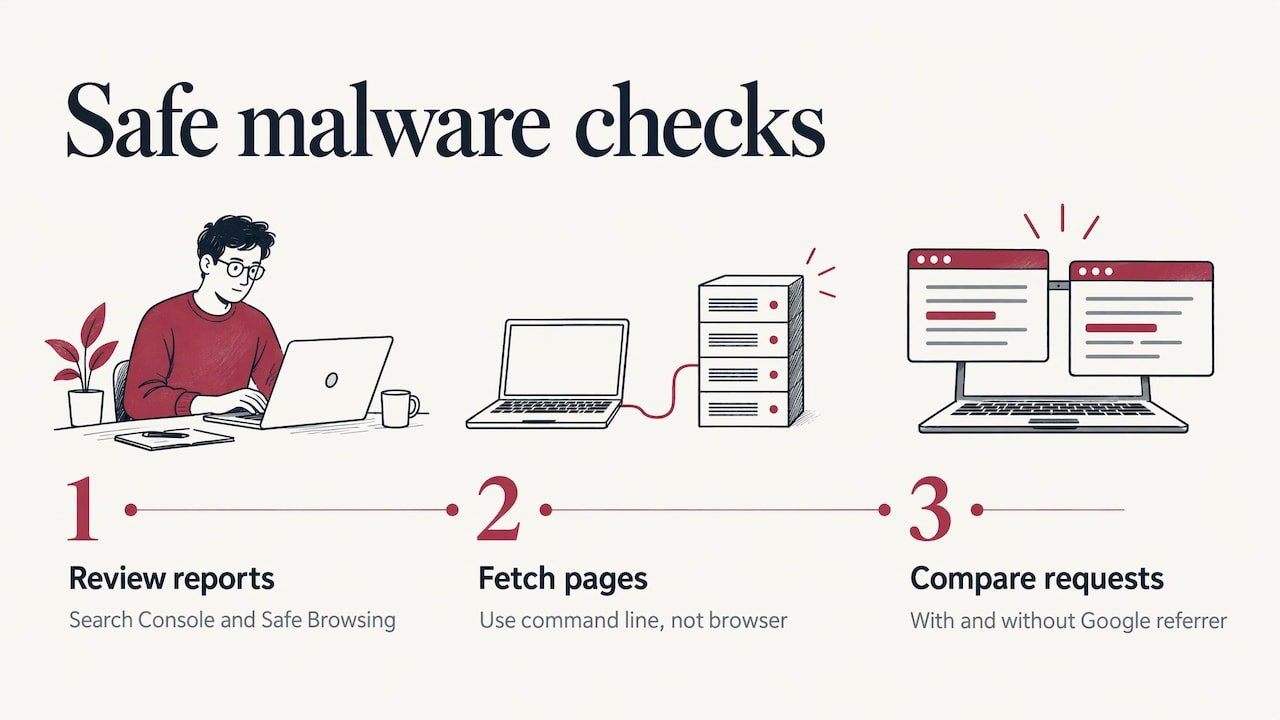
Google’s web.dev hacked-site guide suggests starting with the Security Issues report in Search Console and Google’s Safe Browsing diagnostic page. It also advises fetching suspect pages with a command-line tool rather than opening them in a browser, and trying requests with and without a Google referrer, since malware often only shows itself to search traffic.
Public scanners are a reasonable first look, but know their limit. A remote checker inspects only public content and cannot see private files or the database. Do not paste private links, such as password resets or checkout sessions, into a public scanner. A good record of the result says what was examined and what was not, rather than simply “the site is clean”.
Malware can sit in the database, in a file nobody requests, or activate only under certain conditions, which is why a green result from a free tool means only that no evidence was found.
The first hour: contain and preserve
The Canadian Centre for Cyber Security’s website defacement guidance gives a clear order of work for a business:
- Replace the site with a maintenance page so visitors stop being exposed.
- Inspect the site and the latest backups for hidden malware and vulnerabilities.
- Tell customers and suppliers what happened.
- Restore from backups once they are verified clean.
- Report the incident to police.
- Have technical support work out how the site was compromised.
Before removing anything, save a copy of the suspicious files and scripts. The APWG hacked-website advisory says to keep copies of unauthorized content as evidence, and the copy is also what lets a technician find the entry point. Deleting files in a panic destroys that trail.
Also change passwords for hosting, WordPress admin, FTP and email, but do it after containment, from a device you trust. If customer data or payments may be involved, treat it as urgent and bring in help the same day. Canada’s Get Cyber Safe small business guide notes that some malware cannot be removed without a security expert.
What a proper cleanup involves
Why not just run a plugin and move on? Because removal is only one of the jobs. The APWG advisory says you must determine when and how the site was compromised before restoring, since an uncorrected vulnerability will be exploited again. The Cyber Centre’s guidance on eradication and recovery adds that you must identify everything affected, remove all malicious content, address residual attack vectors, harden and patch, and confirm all malware is gone before restoring backups.
In practice, a thorough job covers:
| Stage | What happens | Where DIY goes wrong |
|---|---|---|
| Contain | Maintenance page, forensic copy, lock down access, remove unknown accounts | Deleting files before copying them |
| Clean | Remove malware, backdoors, injected database content, altered core files | Missing a backdoor, so the infection returns |
| Close the hole | Find the outdated plugin, weak login or other entry point | Restoring a backup that carries the same weakness |
| Harden | Rotate credentials, tighten permissions, update everything | Leaving old admin accounts and stale plugins |
| Verify | Re-scan, check Search Console, request review where flagged | Requesting review too early |
That last point matters for visibility. If Google has flagged your site, fix the problem fully first: submitting a review request before the malware is gone can delay recovery. For a business that lives on local search, every extra week of a warning label in results is lost calls.
What it costs in Canada
Prices vary by provider and severity. Our WordPress Malware Cleanup starts at $299 CAD as a one-off fixed price, which suits a site that needs a defined job done rather than hourly billing. Hourly rates elsewhere in Canada have been published at around $90 CAD per hour, with contained cleanups of three to five hours, per one BC specialist’s service page. Either way, ask what the price includes: entry-point diagnosis, hardening and a written summary.
Why one in-house team matters during a hack
A hacked site is rarely only a hosting problem. The website, the Google Business Profile, ad accounts, tracking and the email that sends your quotes may all be touched. When several vendors share those pieces, each assumes another is responsible and the cleanup stalls. All our services are delivered in-house by one team, so the person fixing the malware is on the same team as the one who built, maintains and advertises the site. If the site is beyond saving or the host is the weak point, our website migration, from $999 CAD one-off, moves it to a clean setup.
Keeping it from happening again
Reinfection comes from the same few causes: outdated plugins and themes, weak or reused passwords, unused admin accounts and unmonitored sites. Prevention is routine work:
- Apply updates promptly. Our guide to what website maintenance covers explains the routine in plain terms.
- Keep backups away from the main server. The Cyber Centre advises asking a host how often it backs up, where backups are stored, how it monitors for unauthorized activity, whether admin accounts use multi-factor authentication, and what its restoration timeline is.
- Watch Search Console. Google recommends checking the Security Issues report, using the site: search to spot unexpected pages, and forwarding malware notifications to your email.
- Use anti-malware software and a firewall, as the Get Cyber Safe guide recommends for small businesses.
Our Keep Safe plan starts at $99 CAD per month, Keep Found at $299 CAD and Keep Growing at $599 CAD, all on our website maintenance page. Our article on why regular updates matter covers the reasoning.
Get the site cleaned by the team that runs it
If you suspect an infection, our WordPress Malware Cleanup starts at $299 CAD one-off. We are based in the Burlington area, have been in business for over 20 years and serve trades, clinics and local service businesses, with leads and messages gathered in UPMYCRM so you can see what your site is bringing in once it is back online.
Start on the WordPress malware cleanup page, or see the full list of quick fixes.
Our perspective
Most owners we talk to treat a hack as a technical embarrassment and rush to make the warning go away. The better instinct is to treat it as a business interruption with a cause.
Our view is that cleanup, diagnosis and prevention belong together. Removing the visible malware without finding the way in is a short-term patch. Finding the way in without a maintenance routine is a repeat visit.
That is why we keep the whole job under one roof: the same team handles the cleanup, the updates afterwards and the site’s search and ad performance, so nothing falls between vendors when a site is down and calls are not coming in.
the author
FAQ
How do I know if my website has a virus?
Look for several signs together: a Google or browser warning, your host suspending the site, unfamiliar admin users, strange pages in search results or visitors being redirected. One symptom alone can have an ordinary cause. If more than one appears, treat the site as compromised.
Can I remove website malware myself?
Simple cases can be cleaned, but hidden backdoors and database injections are easy to miss, and a partial cleanup invites reinfection. If customer data or payments are involved, get specialist help promptly. We offer WordPress malware cleanup from $299 CAD.
How long does a hacked website cleanup take?
It depends on how deep the infection runs. One Canadian specialist publishes three to five hours for a contained cleanup. Review requests to Google add further time afterwards.
Should I report a hacked website?
The Canadian Centre for Cyber Security’s guidance says to report the incident to police and to inform customers and suppliers. If personal information of customers may be exposed, seek advice on your reporting obligations.
Sources
- Security considerations when developing and managing your website (ITSAP.60.005)
- FAQ: My site was hacked, WordPress.org
- What Are the Signs That a Website Has Been Hacked?
- Hacked with malware, web.dev
- How to Scan a Website for Malware: A Practical Guide
- How to check if your website has been hacked
- Website defacement (ITSAP.00.060)
- Improving cyber security resilience through emergency preparedness planning (ITSM.10.014)
- APWG hacked website advisory
- Get Cyber Safe, Protect Your Business
- How to Check and Scan a Website for Malware
- How To Prevent Malware Infection, Google Search Central
- Hacked WordPress Site? Malware Removal