
Clinic Website Design: What Patients Need and What to Build

A good clinic website answers one question fast: can this clinic help me, and how do I reach it? Everything else, the design, the photos, the blog, serves that. At Upmysite, we build and maintain sites for Canadian small businesses, including clinics, from our Burlington base. Our designers, SEO specialists and ad managers are one in-house team, so the site, your Google visibility and your enquiries are planned together. A Starter Site begins at $1,499 CAD, and a Business Site, which suits most multi-service clinics, begins at $2,499 CAD.
This guide covers what patients look for, which pages to build, how to write for them, what privacy and accessibility mean for a clinic, and how to judge a quote.
TL;DR
- Organize the site around what patients need to do (find a service, check if you accept new patients, call or book), not around your internal departments.
- Put the phone number, address, hours and the next step at the top of every key page, and make them tappable on a phone.
- Write in plain language. Many clinic sites are written well above the reading level of the average patient.
- Treat privacy and accessibility as part of the build: a clear privacy notice, express consent on any marketing form, and a site people with disabilities can use.
- Build the site and your local search presence together, so patients nearby can find you and your enquiries land in one place.
Table of Contents
- What patients actually come to a clinic site to do
- The pages a clinic website needs
- Write for the reader, not the textbook
- Mobile first, because patients search on their phones
- Booking and reducing no-shows
- Privacy: what a clinic site has to get right
- Accessibility is part of patient care
- Be found: local search for clinics
- What to ask before you hire a web designer
- What a clinic website costs with us
- Our view
- Get a clinic site that brings in patient enquiries
- FAQ
- Sources
What patients actually come to a clinic site to do
Patients arrive with a task, not a desire to browse. Health authority guidance on planning web content says people come to a page with a question or job to do, and recommends organizing content around stages of the user journey, such as learning about a clinic and preparing for an appointment.
The typical tasks are simple:
- Is this the right kind of clinic for my problem?
- Are you taking new patients?
- Where are you, and when are you open?
- Do I need a referral?
- What do I bring, and what happens at the first visit?
- How do I book, or who do I call?
If your homepage makes a first-time visitor hunt for any of these, you lose them to the next clinic in the search results. That is the practical argument for treating the website as the front desk that is open at 11 p.m.
The problem is common even in large systems. The Saskatchewan Health Authority’s 2020 web renewal research found that only 3% of 1,255 survey respondents always found the information they needed on its public website. The same report quotes patients and staff asking for a single trusted source organized around the information patients need, not around department names. A small clinic can do this better than a large one, because you can keep the site short and current.
The pages a clinic website needs
You do not need fifty pages. You need the right ten, each with a clear job.
Homepage
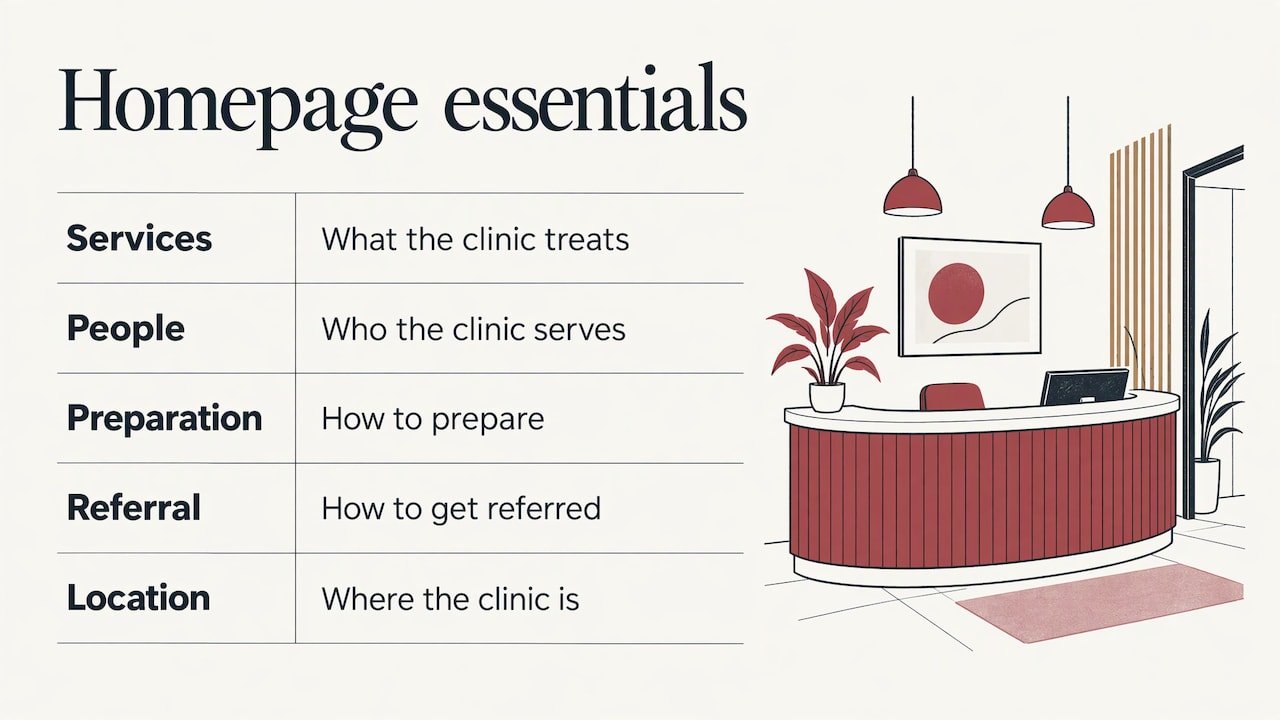
The homepage should say what you treat, where you are and how to take the next step, all visible without scrolling on a phone. Health authority writing guidance for clinic pages puts it simply: explain what the clinic does, who it serves, how to prepare, how to get referred and where it is, and put the most important information at the top.
One page per service or condition
Give each service its own page, written for the patient’s problem. A page titled “Shoulder pain” or “Pediatric dental care” matches how people search, and it gives Google something specific to rank. It also lets you answer the questions of that patient: what the visit involves, who is a good fit, what to bring.
Practitioner pages
Name, role, credentials and a short, human description of how each practitioner works. Include a clear photo. Patients choose people, not logos.
New patients and referrals
Say plainly whether you accept new patients and whether a referral is needed. The same clinic-writing guide recommends standard referral sentences, for example telling patients they do not need a doctor’s referral if that is the case. A Canadian study of family-physician listing websites found that half of the College websites it reviewed did not say whether physicians were accepting new patients. A clear answer on your own site is an easy advantage.
Location, hours and parking
Give the full address, a map, hours, parking and transit notes, and accessibility information for the building. Make the phone number a tap-to-call link.
Contact and booking
Offer every route you actually staff: phone, a short enquiry form, and online booking if you have it. Keep forms short. Name, phone, reason for the visit and preferred time are usually enough.
Privacy notice
Covered below. It needs its own page, linked in the footer.
Fees, coverage and insurance
Patients want to know what is covered by provincial plans, what is private pay, and whether you direct-bill insurers. If you can state it, state it.
FAQ and what to expect
A first-visit page cuts anxiety and cuts phone calls that only ask the same five questions.
Write for the reader, not the textbook
Medical language is where many clinic sites lose patients. The Canadian family-physician website study found all three categories of sites were written at grade 10 to 12 reading levels. A study of private physiotherapy clinic sites also found that they used medical terms hard for lay readers and under-represented children, older adults and people with chronic conditions as potential clients.
That last point deserves attention. If every photo and every example on your site is a young athlete, a patient with a chronic condition or a parent booking for a child may assume you are not for them. Show the range of people you actually treat, and say so in words.
To apply this:
- Use the words patients use first, then the clinical term in brackets if it helps.
- Keep sentences short and put the answer first.
- Explain acronyms and test names the first time they appear. Research on lab-results portals in British Columbia found that 40% of respondents struggled with jargon, and more than half wanted more description of tests.
- Date your content. The Saskatchewan report links trust in online health information to content that is current and error-free, so show a “last reviewed” date on clinical pages and keep it honest.
Mobile first, because patients search on their phones
Most patients will meet your site on a phone, often while in discomfort, often in a hurry. Design for that situation:
- Large tap targets for menu, call and book buttons.
- A sticky “Call” or “Book” button that stays visible as the page scrolls.
- Pages that load quickly. Heavy images and old plugins are the usual cause of slow clinic sites, and a speed fix is often a small one-off job. Our Speed Optimization starts at $399 CAD.
- Forms that work with autofill and don’t demand ten fields.
The usability research agrees with common sense here: in the British Columbia lab-results study, 27% of respondents reported mobile usability problems. If you want the technical reasoning behind speed and conversions, we explain it in how clean web design improves speed, SEO and conversions.
Booking and reducing no-shows
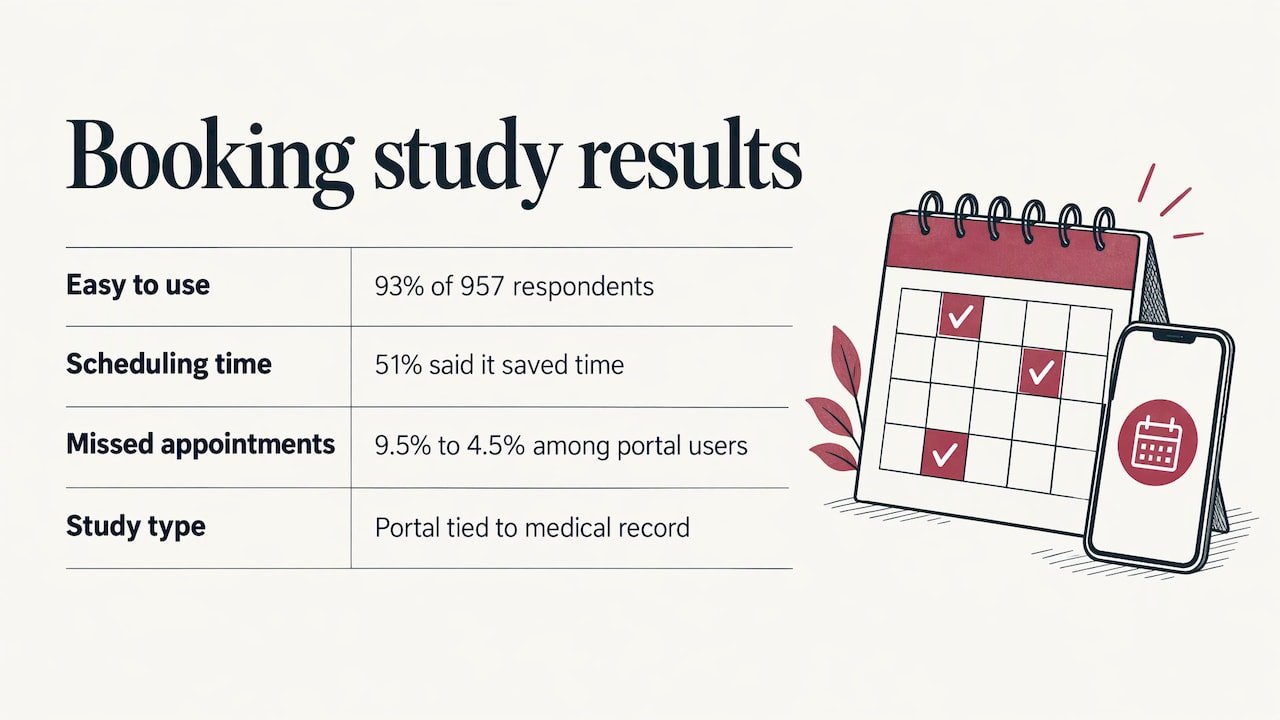
Online booking is the feature most clinic owners ask about. The evidence from Canada is encouraging for the idea of letting patients manage appointments digitally. A 2020 survey study of a patient portal connected to an electronic medical record found that 93% of 957 respondents said it was easy to use, 51% said it saved them time scheduling, and missed appointments fell from 9.5% to 4.5% among portal users.
That study is about a portal tied to a medical record system, not a basic website, so treat it as a direction, not a promise. The practical lesson is that a booking tool works when patients can find it and understand it. Place the button where the eye lands, give two lines of instruction, and keep a phone number beside it for patients who prefer to call.
Missed calls are the other leak. A clinic phone that goes unanswered at lunch or during a procedure loses a booking to the next listing. Our AI Receptionist and missed-call text-back service is set up to reply to callers who could not reach you, so the enquiry is not lost.
Privacy: what a clinic site has to get right
In Ontario, health information custodians (the legal term for clinics and practitioners who hold patients’ health records) are covered by the Personal Health Information Protection Act, PHIPA. The Information and Privacy Commissioner of Ontario’s 2025 handbook for small health care organizations says custodians must have a written public statement summarizing their information practices. It should name a contact person, explain how to ask for access to or correction of records, and describe how to make a privacy complaint to the practice or the Commissioner.
The same handbook says PHIPA requires express consent for using personal health information for marketing or market research, while implied consent generally covers care and referrals. For your website, that has a practical meaning:
- Put a plain-language privacy page in the footer and link it from every form.
- Keep forms to what you need to respond. A contact form is not the place to ask about symptoms or history.
- If you want to add a patient to an email newsletter or a text campaign, get a clear, separate opt-in.
- Run the site over HTTPS, keep it updated and protect admin logins.
Privacy rules differ by province and by your role, so confirm your own obligations with your regulatory college, association or a privacy lawyer. A website team’s job is to build the pages, forms and security so that your policy is visible and followed. Ongoing security matters too: our Keep Safe maintenance plan starts at $99 CAD per month.
Accessibility is part of patient care
A clinic serves people with vision, hearing, motor and cognitive disabilities, and older adults, so an inaccessible site shuts out the very patients you treat. The physiotherapy site analysis found that visual accessibility features such as text-size tools were rarely offered.
A sound baseline for any clinic site:
- Sufficient colour contrast and text that can be enlarged.
- Every image has meaningful alt text.
- Everything works with a keyboard alone.
- Form fields have visible labels and clear error messages.
- Video has captions, and PDFs are readable by screen readers.
Several provinces have accessibility rules for websites, with different thresholds and standards, so check the requirements for your province and size. We walk through the practical steps in our website accessibility guidelines for Canadian businesses. Building these in from the start costs far less than retrofitting later.
Be found: local search for clinics
A beautiful site that nobody finds does not fill the schedule. Patients usually search for a service plus a place, and Google shows a map with nearby clinics first. Three things drive that visibility:
- Your Google Business Profile, with correct hours, services, photos and review responses. Our Google Business Profile Optimization starts at $399 CAD one-off.
- Service pages that name the treatment and the city, written for patients.
- Consistent details (name, address, phone) wherever your clinic is listed.
For ongoing work, our Local SEO plan for one city starts at $499 CAD per month. If you want to see how this works for a local service business, read our piece on web design and local SEO in Burlington.
Measure what matters: calls, form submissions and booking clicks, not just visits. Our Analytics & Tracking Setup starts at $449 CAD one-off, and it lets you see which pages and channels produce patient enquiries.
What to ask before you hire a web designer
A clinic choosing a provider is really choosing how the project will be run. Before you sign, get clear answers to these:
| Question | What a good answer looks like |
|---|---|
| Who builds, writes, optimizes and maintains the site? | One accountable team, not a chain of subcontractors |
| What is the price, and what does it include? | A stated starting price, listed pages, and what is billed monthly |
| How do patient enquiries reach us? | A single place where calls, forms and messages are collected |
| How will the site handle accessibility and privacy pages? | Named standards and a privacy page built into the plan |
| Who looks after updates and security after launch? | A maintenance plan with a monthly fee |
| Who owns the site and the domain? | You do |
| How will we know it works? | Tracking on calls, forms and bookings |
Template marketplaces and design galleries show attractive layouts, but a layout is the smallest part of the job. The real work is the structure, the patient-first writing, the local search setup and the follow-up on every enquiry.
What a clinic website costs with us
Our published starting prices, all in Canadian dollars:
| Item | Starting price |
|---|---|
| Starter Site | $1,499 CAD one-off |
| Business Site | $2,499 CAD one-off |
| Online Store | $3,499 CAD one-off |
| Google Business Profile Optimization | $399 CAD one-off |
| Local SEO | $499 CAD per month |
| Keep Safe maintenance | $99 CAD per month |
| Keep Found maintenance | $299 CAD per month |
| Keep Growing maintenance | $599 CAD per month |
A single-practitioner clinic with a handful of services often fits a Starter Site. A group practice with many practitioners and service pages is better suited to a Business Site. You can see the plans on our web design and development page.
Our view
Most clinic owners we talk to have the same problem: the website exists, but it does not bring in calls. In our experience of building sites for trades, clinics and local services, the fix is rarely a prettier template. It is a site built around the questions patients ask, tied to local search and to a way of tracking every enquiry.
That is why we do the work as one in-house team: web design, SEO, Google and Meta ads, and maintenance. Nothing is handed to a subcontractor, so there is no gap between the person who designs the page and the person who makes sure it is found. Every client also receives UPMYCRM, which consolidates leads and communications in one place, so a form submission or call does not get lost between the front desk and the inbox.
We focus on immediate, measurable results, calls and enquiries, rather than long-term promises. For a clinic, that means a site that tells patients what you treat, who you are and how to reach you, and that is easy to find in your own neighbourhood. We have been in business for over 20 years, and we serve clinics, trades and local service businesses across Burlington, Oakville and Hamilton.
the author
Get a clinic site that brings in patient enquiries
If you want a clinic website built around patient questions, local search and tracked enquiries, we can scope it with you. Start with the Starter Site or Business Site, or contact us through upmysite.ca to discuss what your practice needs.
We handle design, development, local SEO and maintenance in-house, and every client gets UPMYCRM for leads and communications. If you are in Burlington, our Burlington web design page has the local details.
FAQ
How many pages does a clinic website need?
Most small clinics are well served by a homepage, one page per main service, practitioner pages, a new-patient page, a location and contact page, and a privacy page. Add more only when you have something specific for patients to learn. Fewer, clearer pages are easier to keep accurate.
Should a clinic website have online booking?
It helps when patients can find it and understand it. A Canadian study of a portal linked to medical records found lower missed-appointment rates among portal users. Keep your phone number next to the booking button for patients who prefer to call.
What should a clinic put in its privacy notice?
In Ontario, the Information and Privacy Commissioner says custodians need a written statement of their information practices, a contact person, how to request access or correction, and how to complain. Confirm the exact requirements for your province and role with your regulatory college or a privacy lawyer.
Does a clinic website need to be accessible?
Yes, as a matter of patient care, and some provinces set legal requirements for websites. Build in contrast, text sizing, alt text, keyboard navigation and labelled forms from the start. Our accessibility guide walks through the steps.
How long before a new clinic site brings in patients?
A site can produce calls and forms once it is live and your Google Business Profile is set up. Search rankings build over the following months through service pages and local SEO, so tracking calls and enquiries from the first day shows what is working.
Sources
- Create web content with goals, PHSA
- Saskatchewan Health Authority Web Renewal Report, 2020
- How to write for the clinic template, PHSA
- An Exploration of the Content and Usability of Web-Based Family Physician Listings
- Analysis of Private Physiotherapy Clinic Web Sites
- Consumers’ Needs for Laboratory Results Portals, JMIR Human Factors
- Effects of a Patient Portal on Missed Appointments, JMIR
- A Privacy Management Handbook for Small Health Care Providers, IPC Ontario