
Marketing Automation for Small Business: A Practical Guide

Marketing automation is software that follows rules you set once: when a customer does something, it sends a message, updates a record or alerts you. For a small business, the point is not a bigger toolbox. It is that no enquiry goes unanswered. The tools only work when your website, ads and lead records feed them clean data, and that is why we build those pieces together, in-house, with every client getting UPMYCRM to keep leads and communications in one place.
TL;DR
- Automation runs on three parts: a trigger (something happens), conditions (who it applies to) and actions (what the system does).
- Start with revenue-linked routines: instant enquiry replies, quote follow-ups, review requests and win-back messages.
- Automation is only as good as the data behind it: working forms, tracking and a single list of leads.
- In Canada, every automated commercial message needs consent, sender identification and an unsubscribe option under CASL.
- Build in this order: capture, record, respond, measure.
Table of Contents
- What marketing automation is and how it works
- Who actually benefits: the small-business case
- Which tasks to automate first
- Connect the pieces before you buy tools
- Stay on the right side of CASL
- Set up your first workflow in five steps
- What this costs when one team does it
- Perspective
- Put the pieces in place with one team
- FAQ
- Sources
What marketing automation is and how it works
In plain terms, you replace repeated manual follow-up with rules. Shopify’s guide describes three connected parts:
- Trigger: an event, such as a form submission, a purchase or a subscription, starts the sequence.
- Workflow: the actions, conditions and delays that follow, for example “send a confirmation now, a reminder in three days”.
- Data connections: the links between your website, email platform and customer records that tell the workflow who the person is and what they did.
The third part is where small businesses stumble. A workflow can only act on what it can see. If your contact form emails one inbox, your phone calls go nowhere and your ad leads sit in a separate dashboard, there is nothing for the rules to run on.
A concrete example for a plumber: a homeowner fills in the quote form (trigger). The system checks whether they are in your service area (condition). It sends a confirmation text, creates a task to call within the hour, and queues a follow-up for the next day if nobody has replied (actions). You did nothing by hand, and the customer heard back in minutes.
Who actually benefits: the small-business case
Canadian owners already see technology as a time-saver. A CFIB survey of 1,683 business owners, conducted in spring 2025, found 87% of SMEs call technology important for saving time and streamlining processes, and 82% for customer service through tools such as CRMs and chatbots.
The gain differs by type of business:
- Trades and local services: speed of response. The business that calls back first often wins the job.
- Clinics: appointment reminders, intake follow-up and review requests after a visit.
- Retailers: order updates, abandoned-cart recovery and repeat-purchase messages.
- Any business buying ads: every paid click that does not become a logged lead is money lost.
Which tasks to automate first
Forbes’ small-business guide advises automating work that affects revenue and has to happen the same way every time. Examples it gives include service reminders for car and HVAC maintenance, re-engagement of inactive prospects, abandoned-cart emails, and review requests after a purchase or completed appointment. Shopify Canada’s list adds lead capture into a CRM with a welcome sequence, customer tagging and segmentation, and order and shipping updates.
Turn that into a short first list, in this order:
| Priority | Automation | Trigger | What it does |
|---|---|---|---|
| 1 | Instant enquiry reply | Form submission or missed call | Confirms receipt, tells the person what happens next, alerts you |
| 2 | Quote or lead follow-up | No reply after your first contact | Reminder to you and a polite nudge to them after a few days |
| 3 | Review request | Job completed or appointment attended | Asks for a Google review while the experience is fresh |
| 4 | Win-back | No contact or purchase for a set period | A short “it has been a while” message with a reason to return |
| 5 | Cart recovery (online stores) | Items left in cart | One to three reminders spaced over a couple of days |
Resist building ten workflows at once. Each one needs an exit condition: if the customer books, buys or replies, the sequence stops. Nothing irritates a new customer more than a “still interested?” email after they have already paid.
Missed calls are the most overlooked trigger
For trades and clinics, the phone is often the main lead source, and a call that rings out is a lead handed to a competitor. Our AI Receptionist and missed-call text-back service is built for that gap: it answers the moment you cannot. It is the same logic as any automation, a trigger (a missed call) and an immediate action, applied where small businesses lose the most.
Connect the pieces before you buy tools
Most advice on this keyword is a ranked list of software. For a business with one to twenty staff, the better question is what the software will be fed. Work through four layers.
1. Capture
Your website forms, phone number, Google Business Profile and ad landing pages are where leads originate. Each must reliably pass the person’s details and where they came from to your records. A form that errors out, or a site so slow that visitors leave, defeats everything downstream. Our Speed Optimization fix starts from $399 CAD, and the site itself is what our web design and development plans cover, from $1,499 CAD for a Starter Site.
2. Record
One list of leads and customers, with a source and a status on each. If one lead sits in your inbox, another in a spreadsheet and a third in an ad platform, a workflow cannot know who has already been contacted. This is the job of UPMYCRM, which consolidates leads and communications for our clients.
3. Respond
This is the automation itself: the replies, reminders and follow-ups. Keep the first version simple enough to explain in two sentences. Email deliverability matters here, because a perfectly designed sequence that lands in spam does nothing. Our Email Deliverability Fix starts from $149 CAD.
4. Measure
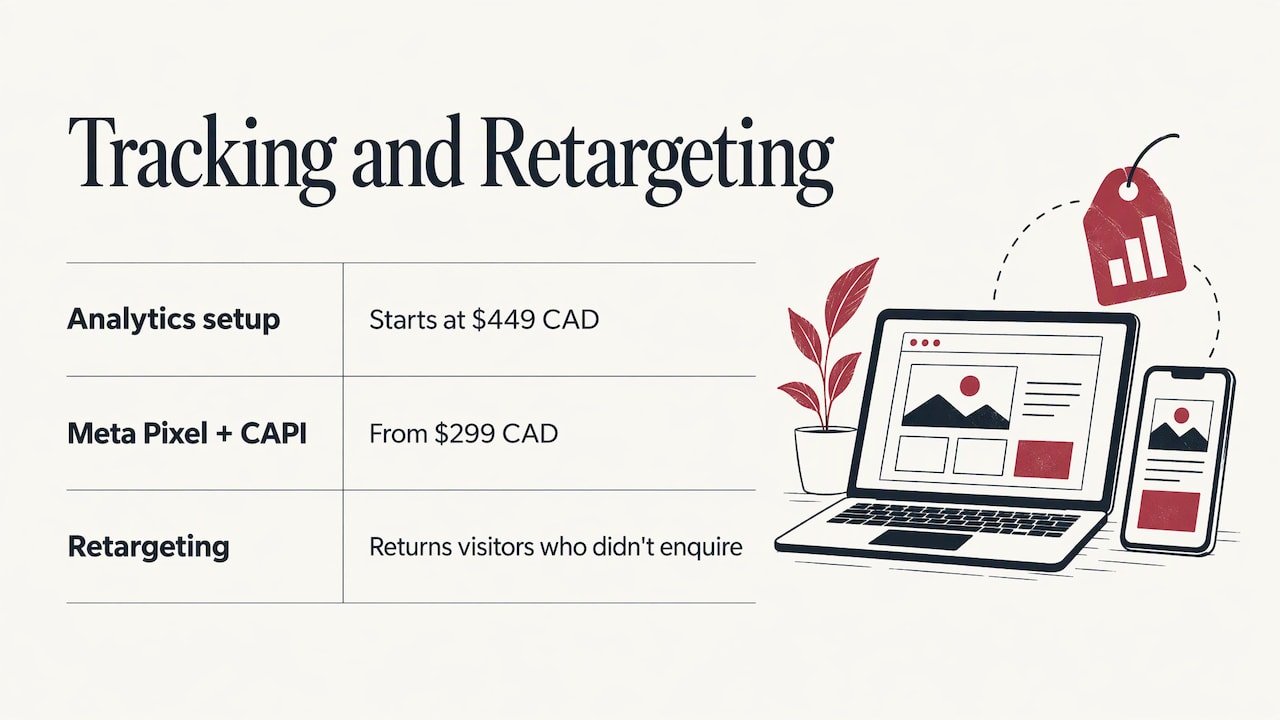
You need to know which source produced which call, form or sale. That means analytics and conversion tracking installed correctly. Analytics & Tracking Setup starts from $449 CAD, and the Meta Pixel and Conversions API setup from $299 CAD feeds your Facebook and Instagram ads the conversion data they need to optimize.
Paid advertising also gains from automation logic. Once you have tracked visitors, retargeting campaigns can bring back people who looked at a service page but did not enquire.
Choosing a platform
Tool types fall into three groups: email-first platforms, ecommerce-focused platforms, and CRMs with built-in automation. Choose by your main channel. A store lives on email and cart recovery. A trade business lives on calls, texts and quote follow-up. A clinic needs reminders and review requests. Then check that the tool connects to your website forms and to wherever your leads are recorded, because a tool that cannot receive your leads automatically will mean double entry within a month.
Stay on the right side of CASL
Canada’s Anti-Spam Legislation (CASL) governs commercial electronic messages, such as promotional emails and texts. The CRTC, the regulator that enforces it, says you must obtain consent, identify yourself and include an unsubscribe mechanism in each message.
The practical rules for your workflows:
- Express consent means the person actively agreed. Use a clear, unticked opt-in on your forms.
- Implied consent can apply when there is an existing business relationship. According to the CRTC, that covers a purchase within the previous two years, or an inquiry within the previous six months.
- Every message needs your identity, your contact details and a working unsubscribe.
- Build exit logic: when someone unsubscribes, every active sequence must stop for them, not only the one they clicked from.
For personal data collected through forms, PIPEDA (the federal privacy law) also applies. Linklaters’ Canada guide explains that consent is valid only where a reasonable person would understand what their information is collected and used for. Say so plainly beside your form.
If you are unsure whether a particular list or sequence is compliant, a lawyer experienced in Canadian privacy and anti-spam law is the right person to confirm it before you send.
Set up your first workflow in five steps
- Pick one goal. For example: reply to every web enquiry within five minutes, at any hour.
- Fix the capture point. Test the form, confirm the notification arrives and confirm the lead lands in your records with its source.
- Write the messages. Two or three short ones, in your own voice, each with one clear next step and an unsubscribe where required.
- Set delays and exits. Follow up after a day or two, then again later; stop when the person replies, books or buys.
- Review monthly. Count enquiries, replies, bookings and reviews. Change one thing at a time.
If enquiries come from ads, add the same check there. When leads dry up, the cause is often tracking or targeting rather than the follow-up, and our guide on why Meta ads stop working walks through where to look.
What this costs when one team does it
Automation is rarely one purchase. It is a site, tracking, ad management, a lead record and the follow-up rules. When these come from different suppliers, each one assumes another is handling the handoff. Our published prices from the client site show what the building blocks look like:
| Piece | Offer | Price |
|---|---|---|
| Website | Starter Site / Business Site / Online Store | from $1,499 / $2,499 / $3,499 CAD, one-off |
| Tracking | Analytics & Tracking Setup | from $449 CAD, one-off |
| Ads | Search Ads / Social Ads / Ads Pro | from $399 / $399 / $749 CAD per month |
| Upkeep | Keep Safe / Keep Found / Keep Growing | from $99 / $299 / $599 CAD per month |
| Local visibility | Google Business Profile Optimization | from $399 CAD, one-off |
See the Google Business Profile Optimization page for what the profile work covers, and our Google Ads for small businesses tips for the ad side.
Perspective
Small business owners tell us the same thing: they do not want a marketing stack, they want the phone to ring and the inbox to fill with real enquiries. Automation helps only when what feeds it is sound.
That is why we build the website, run the Google and Meta ads, set up tracking and give every client UPMYCRM under one in-house team. Nothing is subcontracted, so there is no handoff where a lead gets dropped, and each piece can be set up knowing what the next one needs.
Our focus is on immediate results: calls and enquiries, not long-term promises. With more than 20 years in business serving trades, clinics and local services, our view is simple: get leads captured, recorded and answered quickly, then add sophistication.
the author
Put the pieces in place with one team
If you would rather not coordinate a developer, an ad specialist and a CRM setup yourself, we deliver them together for Canadian small businesses, with clients across the Greater Toronto Area including Burlington, Oakville and Hamilton. Start with the site and tracking, add ads or SEO when you are ready, and keep every lead in UPMYCRM.
See the web design plans, the quick fixes for tracking and deliverability, or start at upmysite.ca.
FAQ
How does marketing automation work?
You define a trigger, such as a form submission, along with conditions and actions. The software then runs the sequence on its own each time the trigger fires. It relies on connections between your website, email or text channel and customer records to know who to message and when.
What should a small business automate first?
Start with the follow-up that most directly affects revenue: an instant reply to new enquiries. Then add quote follow-up and review requests after completed jobs. These are simple, repeat constantly and are easy to measure.
Is marketing automation legal in Canada?
Yes, provided you comply with CASL and PIPEDA. That means consent before sending commercial messages, clear sender identification and a working unsubscribe in each one. Implied consent has time limits, so track when each contact last bought or enquired.
Do I need a CRM to automate marketing?
In practice, yes. Workflows need a single record of each lead, its source and its status. Without one, automations cannot tell who was already contacted. Every Upmysite client receives UPMYCRM for this purpose.
Sources
- Marketing Automation: A Guide for Online Stores (Shopify)
- Marketing Automation for Small Business: Tools and Tips (Shopify Canada)
- How To Automate Your Small Business Marketing (Forbes)
- Digital Transformation (CFIB)
- CASL Guidance on Implied Consent (CRTC)
- Data Protected Canada (Linklaters)