
Google Ads for Contractors: A Canadian Setup Guide

Google Ads works for contractors when it is set up around one outcome: a phone call or quote request from a homeowner or business in your service area. You pick the trades and towns you want, show up when someone searches for them, and track which clicks turn into calls and booked jobs. Below is how to do that in Canada, from choosing between search ads and Local Services Ads to budgeting, targeting, filtering junk leads and measuring results.
TL;DR
- Use two channels together where possible: Google Search campaigns for specific services and towns, and Local Services Ads for pay-per-lead calls and messages.
- Build campaigns by service and by service area (for example, one for furnace replacement in Burlington), not one catch-all campaign.
- Judge results by calls, form fills and booked jobs, not clicks. Set up call and form tracking before you spend.
- Answer every call and message quickly. Google says missed calls and unanswered messages can hurt Local Services Ads ranking.
- Start with a budget you can sustain for several months so the campaign has time to collect data and be tuned.
Table of Contents
- Why Google Ads suits contractors
- Search ads or Local Services Ads: which to start with
- How to set up a campaign for your trade
- How much to budget
- Improve lead quality and stop wasting spend
- Measure calls and booked jobs, not clicks
- Our perspective: ads are only as good as the system behind them
- Where we can help
- A simple first 90 days
- FAQ
- Sources
Why Google Ads suits contractors
Most contractor work starts with a search: “emergency plumber near me”, “roof repair Oakville”, “deck builder Hamilton”. The person is ready to hire, and they are choosing among the first few businesses they see. Google Ads puts you in that moment without waiting months for organic rankings.
That speed is why many trades use it alongside a good website and Google Business Profile. Ads bring in people who are searching today. Your profile and reviews convince them to pick you. Your website closes the enquiry.
There are two main formats, and they behave differently.
Search ads
These are the text ads at the top of results. You choose the keywords, write the ad, set a daily budget and pay when someone clicks. You control which services, towns and times of day you target, so this format is the most flexible. It also needs the most care, because poor keyword choices burn budget quickly.
Local Services Ads
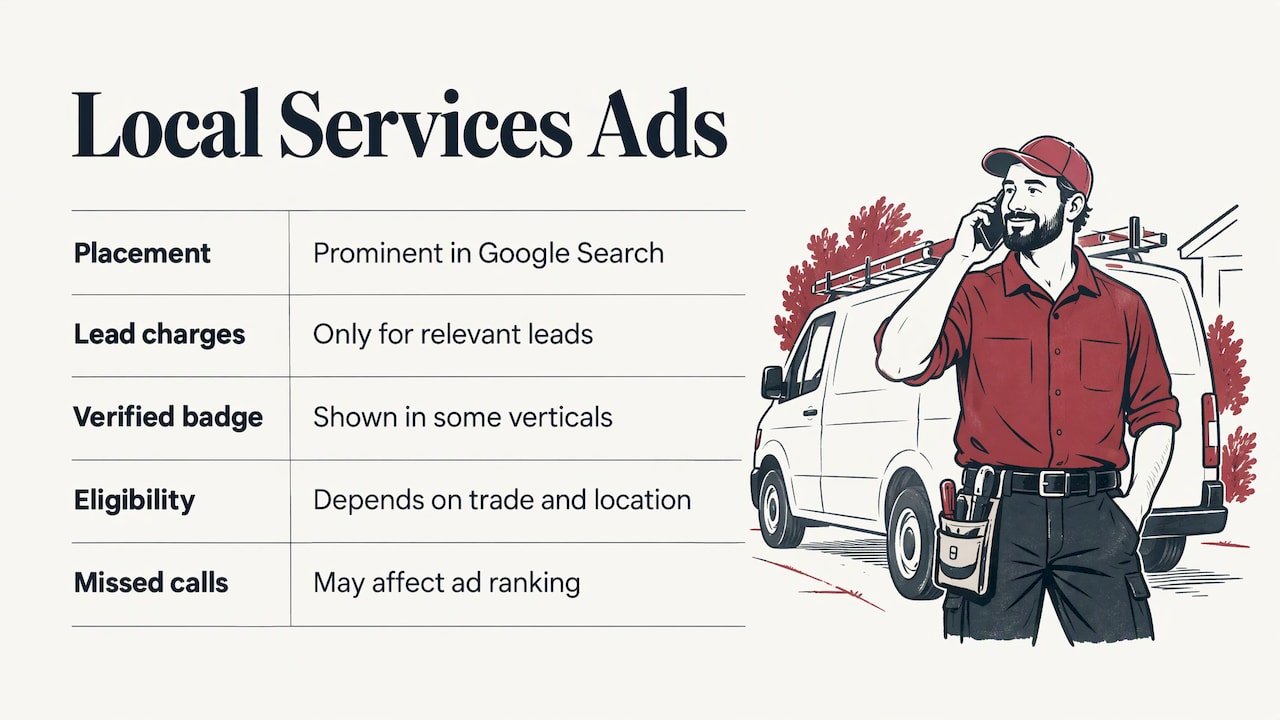
Local Services Ads (LSAs) show up prominently in Google Search results and connect you with customers through calls and messages. According to Google’s Canadian help page for LSAs, you are charged only for leads related to your business and the services you offer, and some verticals display the Google Verified badge. Eligibility depends on your trade and location, so check Google’s current list of categories for Canada before planning around them.
The same page says you can track bookings and lead credits, and that regularly missing calls or ignoring messages may affect your ad ranking. In practice, that makes LSAs a service-quality channel as much as an advertising one. If nobody picks up on the job site, you lose both the lead and some visibility.
Search ads or Local Services Ads: which to start with
You do not have to pick one forever, but it helps to know what each is good at.
| Search ads | Local Services Ads | |
|---|---|---|
| How you pay | Per click | Per valid lead (call or message) |
| Control over keywords | High | Limited, based on your selected services |
| Best for | Specific services, upsell jobs, commercial work | Urgent, high-intent home service calls |
| Setup effort | Higher: keywords, ad copy, landing pages | Verification, service list and service area |
| Main risk | Paying for irrelevant clicks | Missed calls reducing ranking |
If you are in a trade with LSAs available, they are a sensible way to get calls quickly. Search campaigns then fill the gaps: services LSAs do not cover, premium projects such as renovations or additions, and towns where you want extra presence.
How to set up a campaign for your trade
A campaign built for a contractor looks different from one built for a retail shop. Here is the order that works.
1. Decide which jobs you want most
List your services by profit and by how much you want them. A roofer might rank full replacements above small repairs. An HVAC company might want installations more than filter changes. Your ads should lead with those jobs, because they are where each lead is worth the most.
2. Build one campaign per service group
Separate campaigns for separate services let you set budgets by priority and write ads that match what people typed. A search for “basement waterproofing” should land on a page about basement waterproofing, not a general homepage. Within each campaign, group closely related keywords together so the ad text can repeat the phrase the searcher used.
3. Choose keywords that signal intent
Phrases that include a service plus a place or an urgent need tend to come from people ready to hire. Add negative keywords for searches you do not want: “jobs”, “courses”, “DIY”, “free”, “salary”, and any service you do not offer. Review the search terms report weekly at first and add new negatives as irrelevant queries appear. This single habit is among the biggest levers on wasted spend.
4. Target your actual service area
Google’s location targeting lets you reach countries, areas within a country, or radii of at least 1 km. There is also a setting that matters a great deal for trades. “Presence or Interest” can reach people who have shown interest in a location, while “Presence” suits advertisers who want only users in the selected places. If you serve Burlington, Oakville and Hamilton and nothing beyond, “Presence” keeps your ads in front of people actually there, and not someone in another province researching a move.
Draw the area the way you drive it. If you will not travel to a town, exclude it.
5. Write ads that say what you do and where
Include the service, the town, your response time if you can honour it, and a clear action: call now or request a quote. Add a call extension so mobile users can phone with a tap. Mention licences, insurance, warranties and years in business only if they are true and you can show them.
6. Send clicks to a page built to convert
The landing page should match the ad, load fast on a phone, show your phone number at the top and offer a short form. A page that makes people hunt for contact details throws away paid clicks. If your site is slow or dated, fixing it often improves results faster than raising the budget. Our Google Ads management for small businesses work always starts with the landing page for exactly this reason.
How much to budget
There is no single honest number for every contractor, because cost per click and cost per lead vary by trade, city and season. Emergency plumbing and electrical searches in a big market are usually more competitive than painting or fencing in a smaller one. Google does not publish a fixed Canadian rate for Local Services Ads leads either, so treat any universal “average cost per lead” with caution.
A better way to plan is to work backwards from your own numbers:
- What is a job worth? Take your average profit on a typical job, not revenue.
- How many leads become jobs? If you close one in three quotes, you need three qualified leads per job.
- What can you pay per lead? If a job nets $1,500 and you close one in three, spending up to a few hundred dollars per job’s worth of leads can still be profitable.
- How many jobs can you handle? There is no point buying more calls than your crew can serve.
Then add the management cost. Our own Search Ads management starts from $399 per month, and Ads Pro, for broader campaigns, starts from $749 per month. Your ad spend is a separate decision and depends on your trade, your area and how many jobs you want per month.
Give a new campaign time. The first weeks are for gathering data on which searches, ads and pages produce enquiries. Cutting a campaign after a handful of days usually means you pay for the learning and never use it.
Improve lead quality and stop wasting spend
A contractor’s main complaint about Google Ads is not cost, it is bad leads: price shoppers, wrong towns, wrong services, people looking for jobs. These are the fixes that matter most.
- Keep negative keywords current. Check the search terms report and block anything irrelevant.
- Be specific in your ads. If you do not do small jobs, say “full kitchen renovations” and not “all home repairs”.
- Use location settings deliberately. Choose the tighter “Presence” option when you only serve certain areas.
- Schedule ads around when you can answer. Paying for a click at 2 a.m. when no one answers is a poor trade unless you have an after-hours system.
- Qualify on the form. Ask for the service needed, the postal code and a short description. It filters out time wasters before you call back.
- Respond fast. Leads that reach voicemail often call the next contractor. For LSAs, Google says missed calls and unanswered messages can lower your ranking.
If you cannot always pick up, a missed-call text-back or AI receptionist covers the gap. We offer an AI receptionist with missed-call text-back, so a caller who reaches voicemail still gets a reply and a way to book.
Measure calls and booked jobs, not clicks
Clicks tell you very little. What you need to know is how many calls, forms and booked jobs each campaign produced, and what each cost.
Set up this minimum before you spend:
- Call tracking for calls from ads and from your site’s phone number.
- Form submission tracking as a conversion in Google Ads.
- A simple lead log (a spreadsheet works) where every enquiry is marked as quoted, won or lost, with the source.
- A monthly review of cost per lead and cost per booked job by campaign.
For LSAs, Google’s Canadian help page says you can track bookings and lead credits, so use those reports and dispute leads that do not fit your service. Proper conversion tracking is also what lets Google’s bidding learn from real enquiries. If your tracking is missing or broken, our analytics and tracking setup from $449 fixes it, and an ads account audit from $299 reviews an existing account for wasted spend.
Once you have steady data, retargeting can bring back people who visited your site and did not call. We cover how in our guide to Google Ads retargeting.
Our perspective: ads are only as good as the system behind them
We have worked with local service businesses for over 20 years, and the pattern is consistent: contractors rarely fail at Google Ads because Google Ads does not work. They struggle because the pieces are handled by different people who never talk to each other.
One company builds the website. Another runs the ads. A third looks at analytics, if anyone does. When calls drop, each says the problem is someone else’s. That is why we deliver everything in-house with one team: the landing page, the ad campaigns, the tracking and the lead follow-up.
Our focus is immediate results: calls and enquiries you can count, not long-term promises. Every client also gets UPMYCRM, so leads and conversations land in one place instead of scattered across inboxes, voicemails and sticky notes.
For a trade business, we think that is the real advantage. A campaign that sends clicks to a slow page, or to a phone that goes unanswered, wastes money no matter how clever the keywords are. Fix the whole path from search to booked job, and the ad spend starts to make sense.
the author
Where we can help
If you would rather spend your time on job sites than in the Google Ads dashboard, we manage the whole thing for contractors across Burlington, Oakville, Hamilton and the wider Greater Toronto Area. Search Ads starts from $399 per month and Ads Pro from $749 per month, and the work includes tracking and lead management through UPMYCRM.
If your site needs work first, our Starter Site starts from $1,499 and our Business Site from $2,499, both one-off. See the details on our Google Ads management page, or get in touch and tell us your trade and service area.
Pairing ads with a strong Google Business Profile also helps people trust you once they find you. Our Google Business Profile optimization starts from $399 one-off.
A simple first 90 days
A realistic plan keeps you from over-spending early.
Weeks 1 to 2: foundation. Confirm your top three services, service area and phone handling. Set up conversion tracking, check the landing page on a phone, and apply for LSAs if your trade is eligible.
Weeks 3 to 6: launch and prune. Run one campaign for your highest-value service and, if available, LSAs. Check search terms every few days and add negatives. Compare calls against your lead log.
Weeks 7 to 12: expand what works. Add campaigns for your next services, move budget toward the ones producing booked jobs and pause the ones that only produce clicks. Review cost per booked job, not cost per click.
By the end of that period you should know which services and towns pay for themselves, and that is the information you need to decide how far to scale.
FAQ
Are Google Ads worth it for a small contracting business?
They can be, if your jobs are valuable enough to justify paying for each enquiry and you can answer calls quickly. Work out your average profit per job and close rate first, then decide what you can pay per lead. Tracking calls and booked jobs from the start tells you the real answer for your business.
What is the difference between Google Ads and Local Services Ads?
Standard Google Ads charge per click on ads you build around keywords. Local Services Ads connect you with customers through calls and messages, and you are charged for leads related to your services. Many contractors use both.
How do I keep ads from showing outside my service area?
Set location targeting to the towns or radii you serve, and choose the “Presence” option if you only want people physically in those locations. Google’s location targeting guide explains the options. Exclude areas you will not travel to.
How long before I see results?
You can get calls within days of launch, but the first weeks are for learning which searches and pages work. Plan to review results over a few months rather than judging a campaign on its first week.
Do I need a new website before running ads?
Not always, but the page that receives the click has to load quickly, show your phone number and match the ad. If it does not, improving it usually helps more than raising your budget.
Sources
- Getting started with Local Services Ads, Canada (Google Local Services Help)
- Target ads to geographic locations (Google Ads Help)