Missed Call Text Back: How It Works and What to Send
A missed-call text-back is an automatic text message that goes to a caller the moment you can’t pick up. It keeps the lead in a conversation while you finish the job, the appointment or the day. The best setup also logs the caller, so you know who called, what they wanted and which marketing brought them in. We build this for Canadian small businesses as part of our AI receptionist and missed-call text-back service, and what follows is what we would tell any owner before they switch one on.
TL;DR
- A missed-call text-back sends a short text to the caller within seconds of a call you didn’t answer, so they don’t move on to the next business on the list.
- The message works when it is short, names your business, asks one easy question and gives a way to stop receiving texts.
- In Canada, commercial texts fall under CASL: you need consent (an inquiry can create implied consent for six months), clear identification and an unsubscribe mechanism.
- A text-back only pays off if the lead lands somewhere you can see it, with its source. Connect calls, texts and form enquiries in one place.
- Setup takes a few decisions, not a big project: business hours, the message, who gets notified and how you track the result.
Table of Contents
- What a missed-call text-back does
- What to text back after a missed call
- Canadian rules: CASL and your text-back
- How to set up a missed-call text-back
- Tracking website leads: calls, texts and forms
- Related fixes that make the text-back work
- What we offer for missed calls
- Our view: a missed call is a marketing cost, not a phone problem
- FAQ
- Sources
What a missed-call text-back does
When a customer calls a trade business, a clinic or a shop and nobody answers, the call usually ends in one of three ways. They leave a voicemail, which many people don’t. They call the next business. Or they give up. A text-back changes that moment: your phone system detects the unanswered call and sends an SMS from your business number straight away.
The mechanics are simple:
- A customer calls your business line and it rings out, goes busy, or is declined.
- The system recognizes a missed call from a mobile number (a text can’t go to most landlines).
- It sends your pre-written message, or an AI-written reply, to that number.
- The customer replies by text. You or your AI receptionist continues the conversation.
- The call, the text thread and the contact are saved so nothing sits in a personal phone’s call log.
The point is speed and continuity. A customer with a burst pipe, a toothache or a broken sign wants someone to acknowledge them now. A text that arrives in seconds tells them they’ve been heard, and it lets them reply in a way that suits them: in a meeting, on a bus, with a child on their lap.
Missed-call text-back versus voicemail
Voicemail asks the caller to do work: wait for the beep, explain the problem and hope. A text puts the next step in a channel people already check within minutes. It also lets you ask a qualifying question (“Is this for a repair or a new install?”) so that when you do call back, you already know what the job is.
Where it helps most
- Trades and home services: you are on a ladder, under a sink or driving. Calls come in exactly when your hands are busy. Our guide to lead generation for contractors covers where those calls come from in the first place.
- Clinics: front desks are busy at opening, lunch and close, which is when patients tend to call. A text can ask whether the caller wants to book, reschedule or ask a question.
- Retailers and local services: a missed call about stock, hours or a pickup is a sale at risk, and a quick text can answer it.
- After hours: the call that comes in at 8 p.m. gets a reply that says when you open and how to book, rather than silence until morning.
What to text back after a missed call
The message has one job: get a reply. Keep it under about 160 characters where you can, so it displays as a single text. Include four things:
- Your business name, so the caller knows who is texting.
- An acknowledgement that you missed them.
- One easy question or next step.
- An opt-out line, such as “Reply STOP to opt out.”
Examples by type of business
Trades (plumber, electrician, HVAC):
Hi, this is Halton Plumbing. Sorry we missed your call, we’re on a job. What’s going on and what’s your address? We’ll reply shortly. Reply STOP to opt out.
Clinic (physio, dental, chiropractic):
Hi, this is Lakeshore Physio. We missed your call. Are you looking to book, reschedule or ask a question? Reply with one and we’ll follow up. Reply STOP to opt out.
Retail:
Hi, this is Oak Street Home Goods. Sorry we missed you. Were you asking about an item, hours or a pickup? Text us here. Reply STOP to opt out.
(These business names are made up for illustration.)
What goes wrong with the text
- Too long. A paragraph of marketing copy reads as spam and gets ignored.
- A link and nothing else. A bare link looks like phishing. Ask a question first.
- No name. Your number may not be saved in the customer’s phone. Name yourself.
- A promise you can’t keep. “We’ll call in 5 minutes” is a bad line if you’re on a roof until 4. Say “shortly” or give your real callback window.
- Sending to everyone. Calls from suppliers, your own staff and existing clients with different needs should be filtered so you don’t text them.
- No plan for the reply. If the customer answers and nobody sees it for two days, the text did harm. Decide who watches the thread and when.
Canadian rules: CASL and your text-back
In Canada, texts sent for commercial purposes fall under Canada’s Anti-Spam Legislation (CASL), which the CRTC enforces. The CRTC’s own FAQ sets three general requirements for a commercial electronic message: consent, identification information and an unsubscribe mechanism. The same FAQ says an unsubscribe link must stay valid for at least 60 days and that requests must be processed without delay, and no later than 10 business days.
What does that mean for a missed-call text?
- Consent. Consent is either express (the person said yes) or implied. The CRTC’s guidance on an existing business relationship says a person who made an inquiry within the six months before the message can fall into implied consent. A customer who called your business about your services has made an inquiry. A purchase gives a longer window, which the same guidance sets at two years.
- Identification. Name your business in the message, as in the examples above.
- Unsubscribe. Include an opt-out line, and honour a STOP reply immediately. Your system should remember who opted out and never text them again.
- Keep it to the conversation. A reply to someone who just called you is one thing. Using that phone number later for a promotional blast is another, and needs its own consent. Record where each number came from and when.
This is general information, not legal advice. If you run a regulated practice such as a clinic, or you plan to use caller numbers for marketing, ask a Canadian lawyer to check your wording and your consent records. If a message touches health details, keep it to scheduling and leave clinical information for a phone call or your secure patient system.
How to set up a missed-call text-back
Here is the routine, step by step, with the places it goes wrong.
Step 1: Decide which calls get a text
List your business lines: the main number, the number on your Google Business Profile, the number on your ads and the one on your website. Decide whether the text goes out during business hours, after hours or both. Many owners want it on all the time, because a call you can’t answer at 2 p.m. is as lost as one at 9 p.m.
Where it goes wrong: forwarding several numbers into one phone without telling the system which source each came from. You end up with leads and no idea where they started.
Step 2: Write the message and the follow-up
Write the first text using the structure above. Then write what happens after a reply: a second message that asks for the address or preferred time, and an alert to your phone so you see the answer. Keep the tone you would use on the phone.
Where it goes wrong: a first message that sounds like a robot and a second that sounds like you. Customers notice. Settle one voice.
Step 3: Handle the reply
Choose who answers: you, an office manager, or an AI receptionist that handles the first few exchanges (what the job is, where, when) and then hands the thread to a person. Set a rule for emergencies, since “water is pouring through my ceiling” should ring your phone, not wait in a queue.
Where it goes wrong: nobody owns the inbox. Name one person.
Step 4: Save every lead in one place
A text thread on one person’s phone disappears when that person is busy, sick or leaves. Send missed calls, texts and form submissions into one contact list with a timestamp. That’s the difference between a clever auto-reply and a lead process. For a wider view of how this fits with follow-up emails and reminders, see our setup guide to automated lead follow-up and marketing automation for small business.
Where it goes wrong: leads scattered across voicemail, email, the Facebook inbox and a notebook.
Step 5: Test it like a customer
Call your own number from a mobile you don’t normally use, let it ring out, and watch what arrives. Check the sender name, the spelling, the opt-out line, and that your reply reaches the right person. Repeat after hours and from a different carrier.
Where it goes wrong: assuming it works because the dashboard says it’s on.
Tracking website leads: calls, texts and forms
A missed-call text-back creates a second problem you want to have: more leads from more places. Someone finds you on Google, clicks to call, misses you, gets a text and replies. Without tracking, that looks like “a text from an unknown number”.
Tracking website leads means answering three questions for every enquiry: where did this person come from, what did they do, and did it turn into work?
- Calls: a tracked phone number on your site or in your ads lets you tie each call to a source (Google Ads, Local SEO, your Google Business Profile, Meta ads).
- Texts: log each text-back thread against the same contact as the call.
- Forms: record the page and the campaign the visitor came from, not just the name and message.
- Outcomes: mark each lead as booked, quoted, won or lost. Without this, you only count enquiries and not customers.
A tracking number is useful only if it is assigned to the right source and routes calls to a phone that rings, and the call is logged against that source afterwards. A number that records beautifully and never rings is worse than none.
On the website side, Google Analytics 4 and tracking setup records which clicks, calls and form submissions count as conversions, and a Meta Pixel with the Conversions API does the same for your Facebook and Instagram ads. We cover that in Meta Pixel and Conversions API setup. If you advertise, the two together tell you whether the ad budget produced calls or just clicks.
A worked example
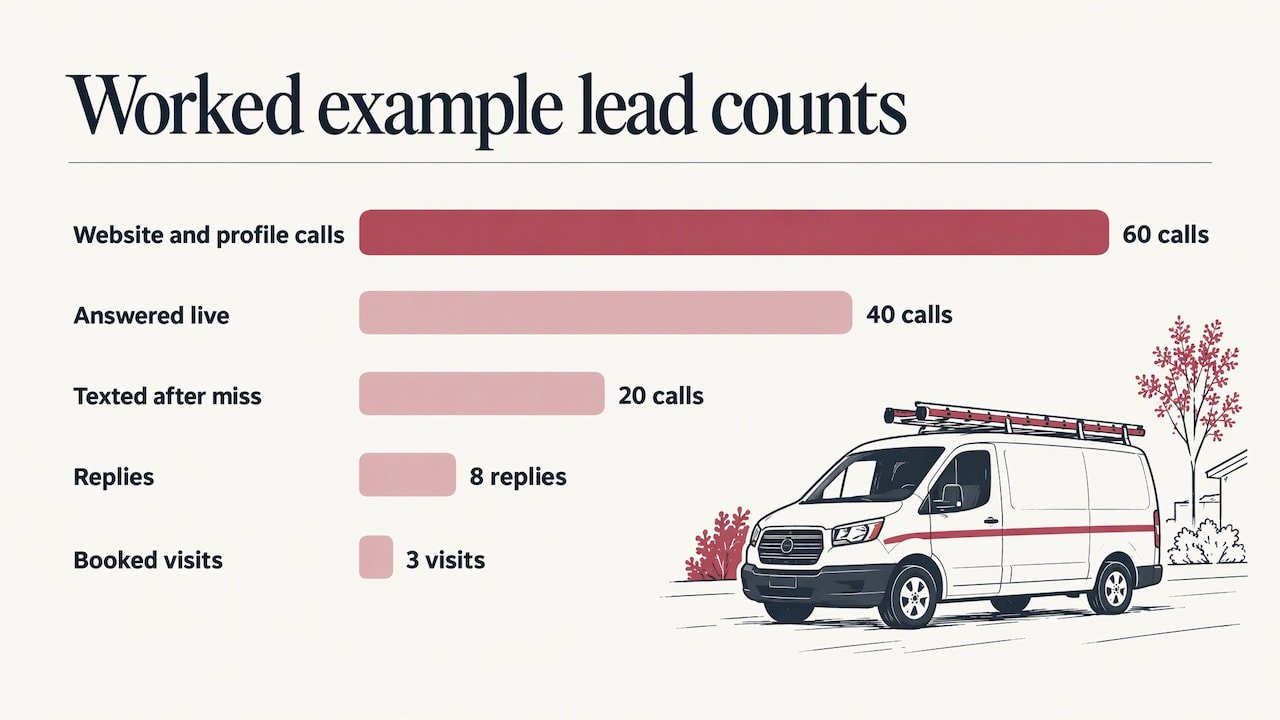
Imagine a Burlington HVAC company running Google Search ads and a Local SEO plan. In a month it logs 60 calls from the website and profile, and answers 40 live. The other 20 get a text. Suppose 8 of the 20 reply and 3 turn into booked visits. Those are 3 jobs that would have gone to a voicemail box. The figures are illustrative, not a promise, but the method is real: count missed calls, replies, bookings and jobs, then compare with the monthly cost of the ads and the system. If you can’t produce those four numbers, tracking is the first thing to fix.
A simple monthly review
Once a month, look at five things: missed calls, texts sent, reply rate, booked jobs and the source of each booked job. Look for patterns. If most missed calls come at lunch, adjust staffing. If most replies come from one campaign, put more budget there. If many callers never reply, rework the first message.
Related fixes that make the text-back work
A text-back is one link in a chain. Three neighbours matter:
- Your Google Business Profile. The call button on it sends people to your phone. Make sure the number, hours and categories are right, because a wrong number sends your text-back to the wrong place. Our Google Business Profile optimization handles it.
- Email deliverability. If the text thread moves to an emailed quote, the quote has to reach the inbox. Correct SPF, DKIM and DMARC records help; we cover that in the email deliverability fix.
- Your website. A visitor who calls from a slow, confusing page is a worse lead. Clear numbers, click-to-call buttons and fast loading all raise the share of visitors who call.
What we offer for missed calls
Our AI receptionist and missed-call text-back is set up by the same in-house team that builds websites, manages Google and Meta ads and runs SEO for Canadian small businesses. That means the number on your site, the number in your ads and the text-back are configured together, and the leads go into UPMYCRM, our platform that consolidates leads and communications in one place.
If you want the missed calls covered and the tracking in place, talk to us about the AI receptionist. If your tracking needs work first, analytics and tracking setup starts from $449 one-off, and you can see everything we do on upmysite.ca.
Our view: a missed call is a marketing cost, not a phone problem
Most owners think of a missed call as bad luck. We think of it as money already spent. You paid for the ad, the website, the profile or the referral that made the phone ring. If nobody answers, that spend ends in a voicemail box.
That is why we put web design, ads, SEO and the missed-call text-back under one roof. When different providers handle each piece, nobody owns the gap where leads fall through. With one in-house team, the person who sets up your ads also sees what happens when the call comes in, and what your lead does next.
We focus on immediate results, calls and enquiries, not long-term promises. A text-back is among the quickest ways to turn the traffic you already have into conversations, and every client gets UPMYCRM so that conversation is saved with its source.
the author
FAQ
Can I automatically text someone after a missed call in Canada?
Yes, but a business text is a commercial message under CASL, so you need consent, your identification and an opt-out. A person who has just called to enquire about your services may fall under implied consent for six months, according to the CRTC’s guidance on existing business relationships. Keep the text to the enquiry and honour any STOP reply right away.
What should I text back after a missed call?
Name your business, say you missed the call, and ask one simple question such as what they need or when suits them. Add an opt-out line. Keep it short enough to read at a glance and write it in the tone you use on the phone.
Does a missed-call text-back work on landlines?
A text can only reach a mobile number, so callers on landlines won’t receive it. Most customer calls to local businesses come from mobiles, which is why the tool is useful, but your voicemail greeting should still tell landline callers how to reach you.
How do I track which marketing produced a call or text?
Give each source its own tracking number or conversion event, route it to a phone that rings, and save each call, text and form in one contact record. Then mark which leads became jobs. Analytics and conversion tracking on your website and ad accounts complete the picture.
Is the text-back the same as an AI receptionist?
Not quite. A text-back sends the first reply after a missed call. An AI receptionist can carry on the conversation, gather the job details and pass the thread to you. They are often set up together.
Sources
- Frequently Asked Questions about Canada’s Anti-Spam Legislation (CRTC)
- Canada’s Anti-Spam Legislation Guidance on Implied Consent (CRTC)